

Deep focus is sustained attention on one cognitively demanding task, held long enough for context to stay loaded, with the usual escape routes kept out of reach. If you've lost half an hour to a phone check and still haven't started, that's not a character flaw, it's a setup problem.
You probably know the scene already. One tab is open, the work is real, the phone is near your hand, and your brain keeps reaching for the easiest exit.
The fix starts with a plain definition. Deep focus is sustained attention on one demanding task, protected long enough for the mind to keep the goal active and make actual progress. It isn't staring at a screen. It isn't being “in the zone” for a few seconds. It's a closed environment for attention, built so the mind doesn't keep renegotiating what to do next.
That last part matters more than people admit. Most focus advice talks like the problem is motivation. Mine was never motivation. It was access. The phone was always there, and that was enough.
A Working Definition You Can Use Today
You don't need a grand theory to know whether a session is real. If you sat down to write, code, study, or solve a problem and spent the first ten minutes bouncing between tabs, messages, and the clock, you didn't have deep focus. You had fragments.
Deep focus is a block of time with one clear output and no easy exit ramps. The task needs to be demanding enough that your attention has somewhere to go, and the environment needs to stop offering better options every few seconds. That's why a timer alone doesn't create it.
The useful test is simple. Did you stay with one cognitively demanding task long enough to keep the context in your head, or did you keep restarting after each interruption?
Practical rule: if you can switch out of the task without thinking, the setup is too loose.
People get confused about this. They think deep focus is a mood. It isn't. It's a condition you create. You choose one task, remove the easiest distractions, and make it costly enough to bail that your brain stops treating quitting as the default move.
That's also why phone presence matters even before you touch it. The device becomes an open exit route. If you're serious about a focus block, the question isn't whether you feel ready. It's whether the surrounding setup keeps the task alive long enough for your attention to do its job.
Where the Science of Deep Focus Comes From
The idea starts with flow, the psychological state in which someone becomes absorbed in a demanding activity and loses track of distractions. Mihaly Csikszentmihalyi began studying it systematically in the 1970s, and his key move was measurement. Working with Suzanne Prescott, he used the Experience Sampling Method, which sent random pager prompts during ordinary life instead of relying on later memory. That let researchers catch attention in motion, not just describe it after the fact, as Clark University explains in its overview of Csikszentmihalyi's work. Clark University on Csikszentmihalyi, flow, and the Experience Sampling Method
The method changed what researchers could say with confidence. Csikszentmihalyi explained that if participants reported flow-like experiences in 1 out of every 10 responses, researchers could infer that about 10% of their lives were spent in a flow-like state. That does not mean people were in flow all day. It means focus could be observed in real life, inside ordinary routines.
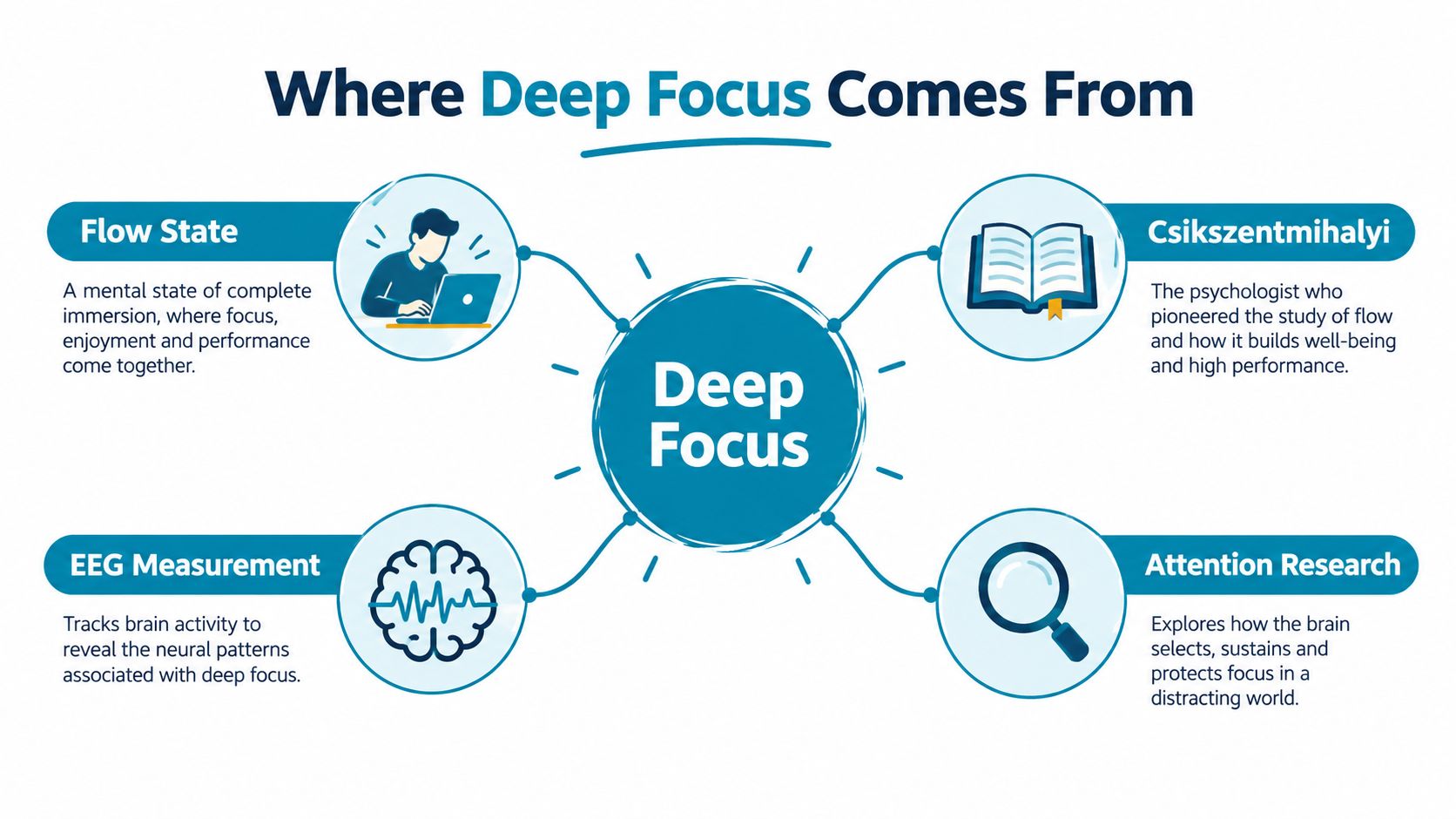
What that means for a work session
The older research still matters because it points to the same design problem today. Deep focus needs a defined objective, a protected interval, and a setting that does not keep changing the task in front of you.
A focus block works when the task stays the same long enough for your brain to stop reloading the plan.
That is also why a session feels stronger when it leaves something concrete behind. A solved problem set. A finished draft. A clean stretch of code. The point is not to feel attentive. The point is to finish demanding work while attention stays on one line of effort.
For a plain-language overview of how the publisher frames this topic, the about page keeps the same basic idea in one place. About TiedSiren
Why Interruptions Cost Far More Than They Feel Like
The biggest lie interruptions tell is that they're short. They're not short in the way that matters. They break the mental model you were holding, and rebuilding that model takes time.
Task-switching research by Rubinstein, Meyer, and Evans is often summarized as showing that switching can consume up to 40% of productive time in controlled experiments, though that figure isn't a universal workplace rule. Gloria Mark's work, as summarized in the cited research overview, shows how screen dwell time dropped from about 2.5 minutes in 2004 to 75 seconds in 2012, with later reporting placing the median near 47 seconds. Interruptions also carry a recovery cost, with summaries estimating about 23 minutes to return to the previous level of focus after one interruption. Reclaim AI's summary of deep work and shallow work research
What those numbers mean in practice
A quick check doesn't stay quick. You open the phone, glance at something, and the task you were holding starts to decay. The issue isn't only the lost minute. It's the time needed to reconstruct the task context you just knocked loose.
That's why attention residue matters. Sophie Leroy's work is commonly used to describe the way an unfinished first task keeps part of the mind occupied while you try to start the second. The second task suffers because the first one never fully left the room.
The practical lesson is brutal but useful. A long block of continuous attention beats a session built around frequent rescue missions.
If you keep interrupting yourself, you're not saving time. You're paying for the same context over and over.
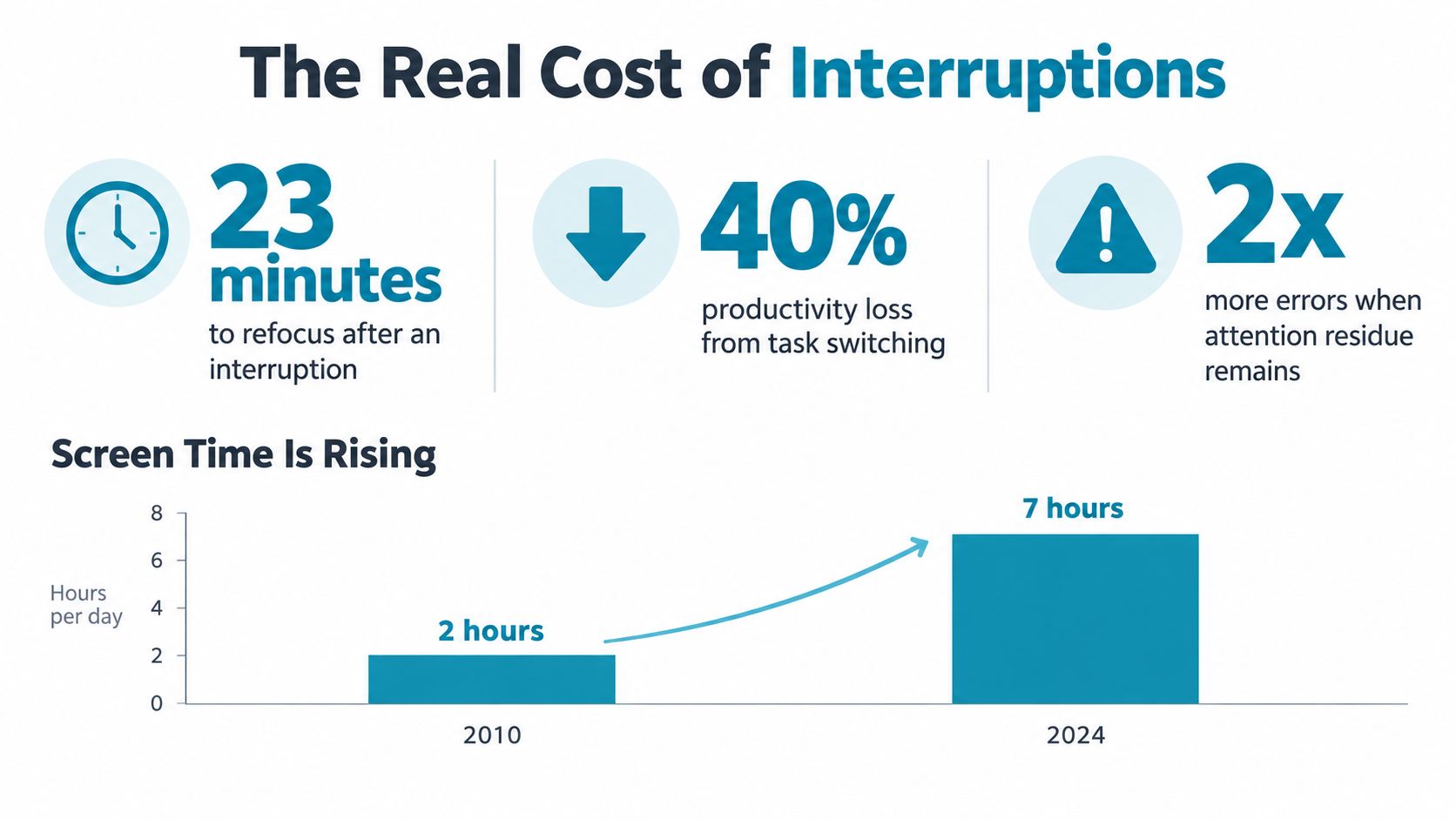
The same pattern shows up in screen behavior. When people keep switching, the day fills with fragments, not progress. That's why deep focus has to be protected as a continuous period, not treated as a vague desire to “stay on task.”
The Phone Is an Access Problem
A phone can pull attention before you touch it. A controlled study summarized in the research literature found that people performed worse on an attention test when a smartphone was present than when it was absent, with both attention and working-speed scores dropping in the phone-present condition. Smartphone presence and attention performance
That is why “I'll just ignore it” fails so often. A sound, a vibration, or even a lit screen turns a quiet background object into a decision you have to make.
Three levels of access
The question is simple: which forms of access need to disappear so focus can hold?
A review of smartphone-cognition research reports that mobile notifications disrupted performance on an attention-demanding task by an amount comparable to active phone use, and that an unintended interruption from another app delayed task completion by as much as 400%. The same review points to a plain conclusion, digital triggers can break concentration even when the device stays in your hand or on the desk. Review of smartphone notifications and interruption effects
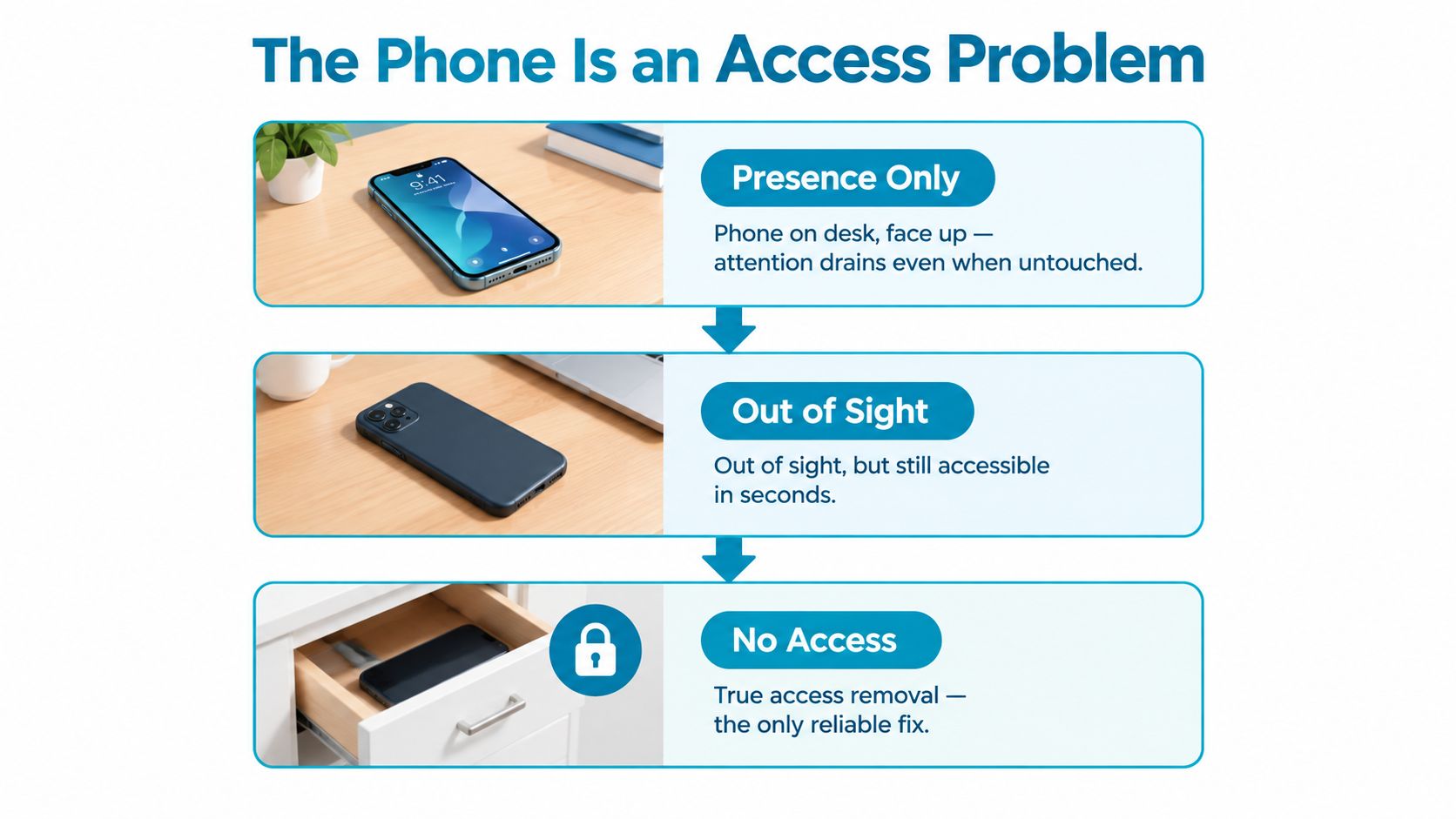
Three levers matter here.
- Physical distance: move the phone out of arm's reach so it stops acting like an easy exit.
- Notification control: silence the pings and banners that keep asking for attention.
- Precommitted blocking: make the distracting apps unavailable for a fixed window, so the choice is made before the weak moment arrives.
The strongest setup slows the impulsive bypass. On Android, TiedSiren is a free app blocker that lets you choose apps in advance, run a session for a set duration, and keep that decision in place while the session runs. It offers Strict Mode, blocks the Android Settings screen during a session, supports custom blocklists, scheduled sessions with daily or weekly recurrence, and a focus timer showing time left. TiedSiren features
That is not magic. It just adds friction to the exact move people make when they get restless and try to undo the block right away. The point is to make the phone harder to reach, harder to hear, and harder to reopen until the work block is over.
Tools and Techniques That Hold the Line
A timer helps, but it does not solve the problem. If the phone is still within easy reach, the clock just runs while your attention keeps arguing with itself.
Start with the lightest intervention that changes behavior. Turn off the obvious triggers. Put the device out of reach. Then block the apps that usually win the argument. Each step removes a different exit path, so focus has a place to stay.
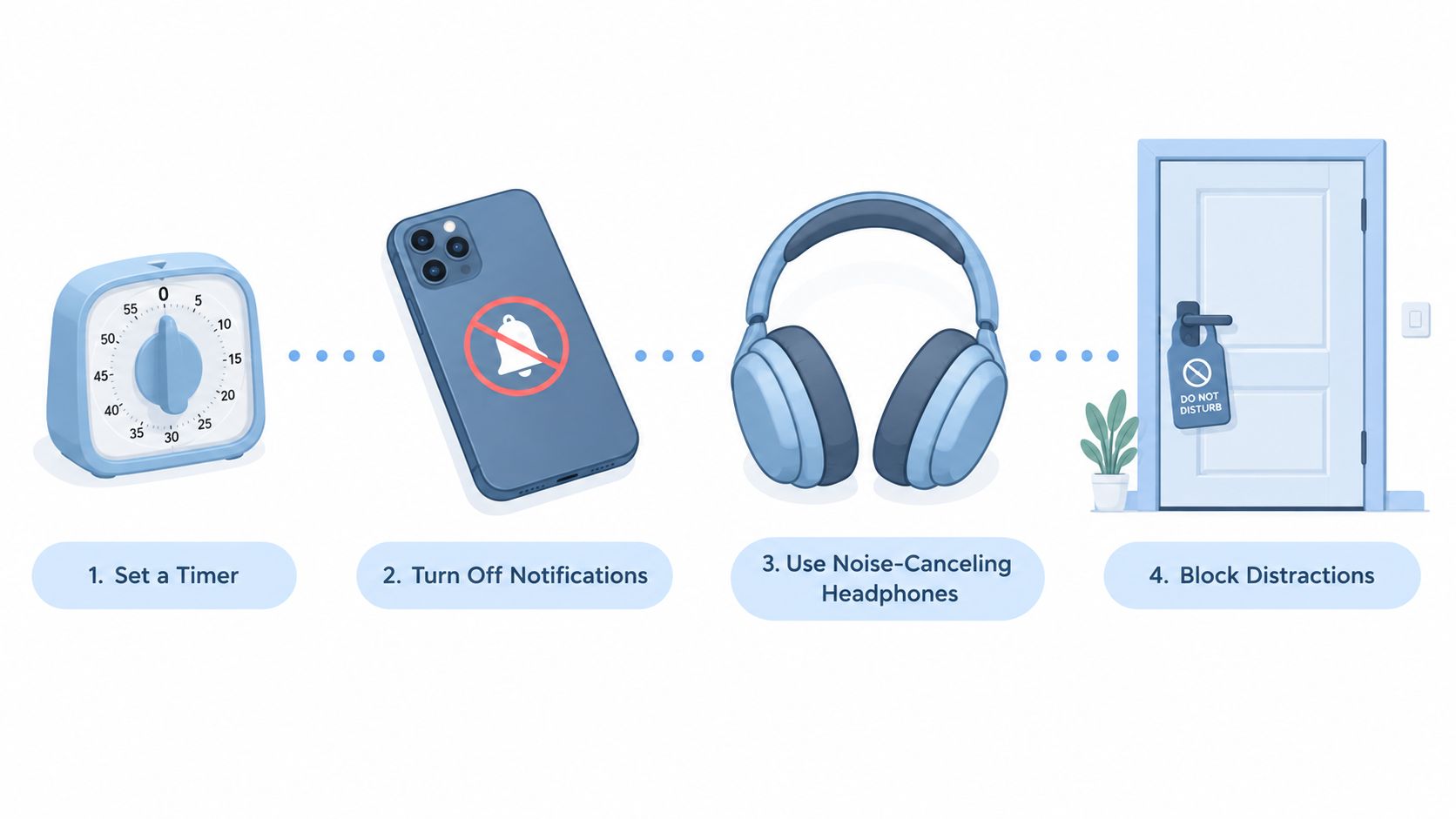
What to choose when your blocker keeps getting turned off
If your failure mode is reaching for the settings screen and undoing the blocker, the issue is easy access. A blocker helps when it makes that move slower and keeps the session decision in place long enough for work to happen.
The setup around the blocker matters as much as the blocker itself. The session should feel like a real boundary, not a suggestion. A visible timer gives the block a shape. A recurring schedule removes one daily choice. A context-specific blocklist helps because work, study, and sleep pull on different weak points.
The tool should make the impulsive detour annoying, not dramatic.
A few readers will want a simple rule. Here it is. If the app lives on the same device you keep checking, the blocker has to be harder to dismiss than the urge to escape. The product details are on the features page.
TiedSiren is one example of that kind of setup. It lets you choose apps in advance, keep a session in place for a set duration, use Strict Mode, block the Android Settings screen during a session, set custom blocklists, and run scheduled sessions with daily or weekly recurrence. It also includes a focus timer that shows time left.
A blocker will never make a phone impossible to bypass on Android. That is not the standard. The standard is whether it stops the immediate, thoughtless escape you would normally take when the work gets uncomfortable.
Designing One Realistic Focus Block
A good focus block is small enough to start and strict enough to matter. Fifty minutes is a useful shape for many people because it gives the task time to settle without asking for a heroic stretch.
Pick one demanding output before the block starts. Write the first page. Solve three problems. Clean up one function. Don't choose “work on project” and call that a plan. The brain needs a target it can hold.
A clean block looks like this
- Choose one task: one paper, one code file, one problem set.
- Block the known traps: remove the apps that usually pull you off task.
- Set the break in advance: if you need one, place it after the block, not in the middle of renegotiating.
- Judge the block by output: count what got finished, not how noble the effort felt.
A controlled Cognition study found that participants doing a roughly 50-minute repetitive task kept their performance when they were given two brief, rare diversions, while participants without breaks showed declining vigilance. That doesn't mean you should wander freely during a block. It means a protected session followed by a deliberate break can work better than pretending the mind should never need relief. Study summary on interruptions, breaks, and vigilance
What matters is the placement. A break is useful when it's part of the design. It's destructive when it arrives as a random excuse to check something else. If you need a blocker to hold the line, use one, but treat the session as a closed room until the timer ends.
For Android users who want that friction in a dedicated app, the download path is here. TiedSiren download
What to Do With This Tomorrow Morning
Tonight, decide which apps are the problem and set a recurring block around the work window you keep missing. Tomorrow, judge the first session by whether you finished one concrete thing, not by whether you felt disciplined.
If you're on Android, install from the Google Play listing or use the download page. If you're on iPhone, Mac, or Windows, TiedSiren isn't released there, so don't waste time looking for a version that isn't available.
TiedSiren gives Android users a fixed session, a focus timer, custom blocklists, scheduled sessions, and session friction that raises the cost of turning the blocker off mid-urge. If your real problem is the moment you give yourself an easy out, that kind of setup fits this topic exactly. You can read more and decide whether it matches your routine at TiedSiren.