
The most popular advice about how to get around an Instagram block is also the advice most likely to waste your time: switch networks, create another account, reinstall the app, and keep going. That treats every block as a technical glitch. It isn't. Instagram has several different enforcement outcomes, and the right response depends on whether another person blocked you, Instagram restricted an action, or Meta disabled the account itself.
A network change can sometimes alter where traffic appears to come from, but it won't erase an account history, a behavioral pattern, or a platform decision. Instagram processed large volumes of enforcement actions in the first half of 2026, including 213 million removals from Instagram, according to Meta's enforcement report coverage. Your first move should be identification, not circumvention.
Why Bypassing an Instagram Block Is Usually the Wrong Goal
Searching this phrase don't want access restored in the abstract. They want to keep doing the exact thing that caused trouble, whether that means aggressive following, mass liking, repetitive comments, scraping, or automated outreach. A workaround that gets one action through can encourage the same behavior that triggered the restriction, which risks extending the problem or turning a temporary limit into a more serious account penalty.
That's why “wait it out” is incomplete advice. Waiting may be sensible for an action block, but it does nothing for a personal block and doesn't solve a disabled account. You need to know which kind of problem you have before deciding whether waiting, appealing, changing behavior, or accepting the block makes sense.
Practical rule: Don't troubleshoot the network until you've identified whether Instagram or another user caused the block.
There are three useful categories:
- Personal block: another Instagram user has blocked your account. Your account still works elsewhere, but you can't normally view that person's profile or contact them.
- Action block: Instagram has restricted an activity such as liking, commenting, following, or messaging. The account itself may remain accessible.
- Disabled account: Instagram has revoked access to the account, often with a login notice or an inaccessible profile. Recovery requires a formal review rather than a technical trick.
Instagram doesn't publish universal daily caps for follows, likes, comments, or messages. Independent reporting says limits can vary with account age, history, and behavior, and that action blocks often appear quickly after suspicious activity and can last from hours to several days. Repeated behavior can produce longer restrictions, so impulsive bursts are exactly the wrong response. Reporting on Instagram limits and account history also describes persistent records of reports and enforcement actions, not a one-time switch you can reset by reinstalling the app.
If you're trying to control your own late-night Instagram use rather than defeat someone else's privacy decision, TiedSiren's Android app addresses a different problem. It lets you commit to a blocking session in advance, but it isn't a method for bypassing Meta enforcement.
How Instagram's Automated Enforcement Works
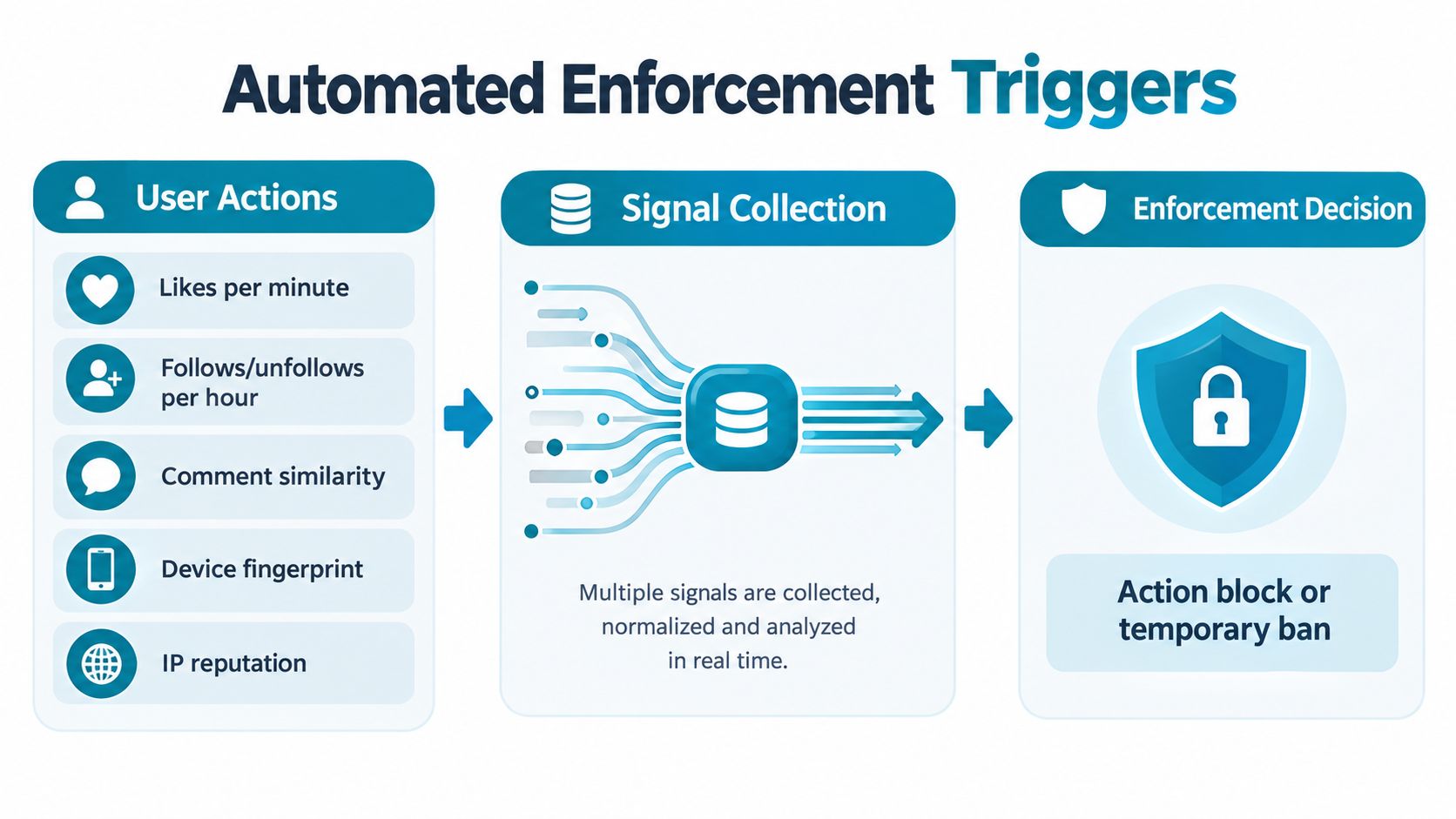
Instagram does not need an employee watching every follow, like, or comment. Meta's systems process behavior at scale, collect signals, and restrict accounts when activity resembles spam, automation, or abuse. In the first half of 2026, Meta reported around 24.2 million Instagram moderation actions, according to the published enforcement report summary.
The system can assess the pace of follows and unfollows, repeated likes, near-identical comments, unusual messaging patterns, device details, network reputation, and links between accounts. Instagram does not show you its internal score or threshold. Instead, you see an outcome, such as an action warning, a blocked feature, or a broader account restriction.
Why changing one signal rarely fixes the account
A VPN or mobile connection changes only the network signal. It does not erase earlier actions, change the device, sever linked-account relationships, or alter the content pattern that triggered the restriction. A second account can still be associated with the same device or behavior, especially if it immediately repeats the same activity.
Instagram's enforcement pipeline also produces inconsistent results. In an external review by the Anti-Defamation League, researchers submitted 253 pieces of hateful or extremist content through Instagram's reporting system in early 2026. Instagram removed 19 items and left 93% of the flagged material in place. That variation does not make circumvention a smart shortcut. It means automated and human reviews can reach different outcomes, so a vague appeal gives reviewers little to assess. A precise explanation with relevant documentation is the stronger route.
Instagram evaluates patterns, not only individual button presses. A clean session on a new network does not automatically make an account look clean.
If your real problem is stopping yourself from opening Instagram during a committed Android focus session, read TiedSiren's developer information. It concerns access control on your own phone, not Meta's account enforcement.
Three Different Kinds of Instagram Blocks People Confuse
A personal block, an action block, and a disabled account can look similar when you're frustrated, but they require different responses. Applying the wrong fix creates unnecessary risk. Someone who has been blocked by another user shouldn't submit an account appeal, while someone with a disabled account shouldn't waste time changing Wi-Fi networks.
| Block Type | Visible Signs | Common Cause | Appeal Targets |
|---|---|---|---|
| Personal block | One person's profile, posts, or messages are unavailable to you, while other Instagram features still work | Another user chose to block your account | Usually nothing inside Instagram. The issue is the other person's privacy decision |
| Action block | You can log in, but Instagram stops a specific action such as liking, commenting, following, or messaging | Activity that resembles spam, automation, or abnormal usage | The restricted action, the account history, or a possible mistaken enforcement decision |
| Disabled account | Login access is revoked, the profile may be hidden, and content may be inaccessible | A serious or repeated policy issue, compromised-account concern, or mistaken identity | The account disablement and your identity or policy explanation |
Personal blocks are social, not technical
If one person blocked you, switching to another account to view or contact them crosses a clear boundary. Instagram now supports blocking an account and other accounts that the same person may have or create, so a second profile isn't a reliable escape route. The Instagram announcement on creator safety tools describes this broader anti-evader behavior and shows why older advice about making another account is incomplete.
The productive options are limited: respect the block, use another legitimate communication channel only when there's a genuine reason, or leave the situation alone. There's no appeal that forces another person to restore access.
Action blocks are narrower
An action block usually leaves much of the account usable. Look for a notice that names the affected action or gives an expiry. Stop the restricted activity, review connected tools, and use Instagram's own review route if you believe the decision is mistaken.
Disabled accounts need recovery, not a bypass
A disabled account is an access problem. Save the exact notice, keep records of appeal submissions, and follow a policy-specific recovery route. Guidance on Instagram account recovery emphasizes documenting the notice and appeal history rather than sending repeated generic complaints.
Common Workarounds and Why Most of Them Fail
The classic workaround list sounds technical, but most suggestions attack the wrong layer. Instagram can associate activity with the account, device, network, and behavior. Clearing a local app state doesn't remove records held on Meta's servers.
| Workaround | What People Expect | What Actually Happens |
|---|---|---|
| Switch to mobile data | The new connection will make the block disappear | It changes the network path, but the account may still be restricted |
| Create a second account | A fresh profile will have a clean start | The device and behavior can still connect the activity, and repeated evasion can create more enforcement |
| Use a VPN or proxy | A different endpoint will defeat the restriction | It may help with a network-specific issue, but unfamiliar or poor-quality traffic can create more suspicion |
| Clear cookies or reinstall Instagram | The app will forget the restriction | Server-side enforcement remains in place |
| Change home Wi-Fi | The new network will restore likes or follows | It only helps when the original network itself has a reputation problem |
Network changes have a narrow use
Instagram restrictions can sometimes operate at the network layer. Proxy-based guidance for Android describes changing manual proxy settings or using mobile proxies to make traffic appear to originate from another endpoint, as outlined in this guide to Instagram unblocking methods. That doesn't mean a VPN is a general solution.
A network change makes sense only when the IP or network itself appears to be associated with abusive activity and the account is otherwise behaving normally. It doesn't make sense as a license to continue rapid follows, repetitive comments, or mass messages. If the account is rate-limited, moving from Wi-Fi to mobile data usually leaves the central problem untouched.
Secondary accounts are a poor emergency exit
A second account can inherit context from the same device and usage pattern. If you create it at 2am and immediately repeat the activity that triggered the first restriction, you've supplied another suspicious pattern rather than a clean recovery path. Instagram's broader account-blocking behavior also means a personal block may cover related accounts.
Reinstalling is the least useful suggestion of all. It can fix an ordinary app bug, but it cannot erase a moderation record or change an account-level decision. Stop spending time on local resets when the notice clearly identifies an Instagram restriction.
How to Appeal an Instagram Block the Right Way
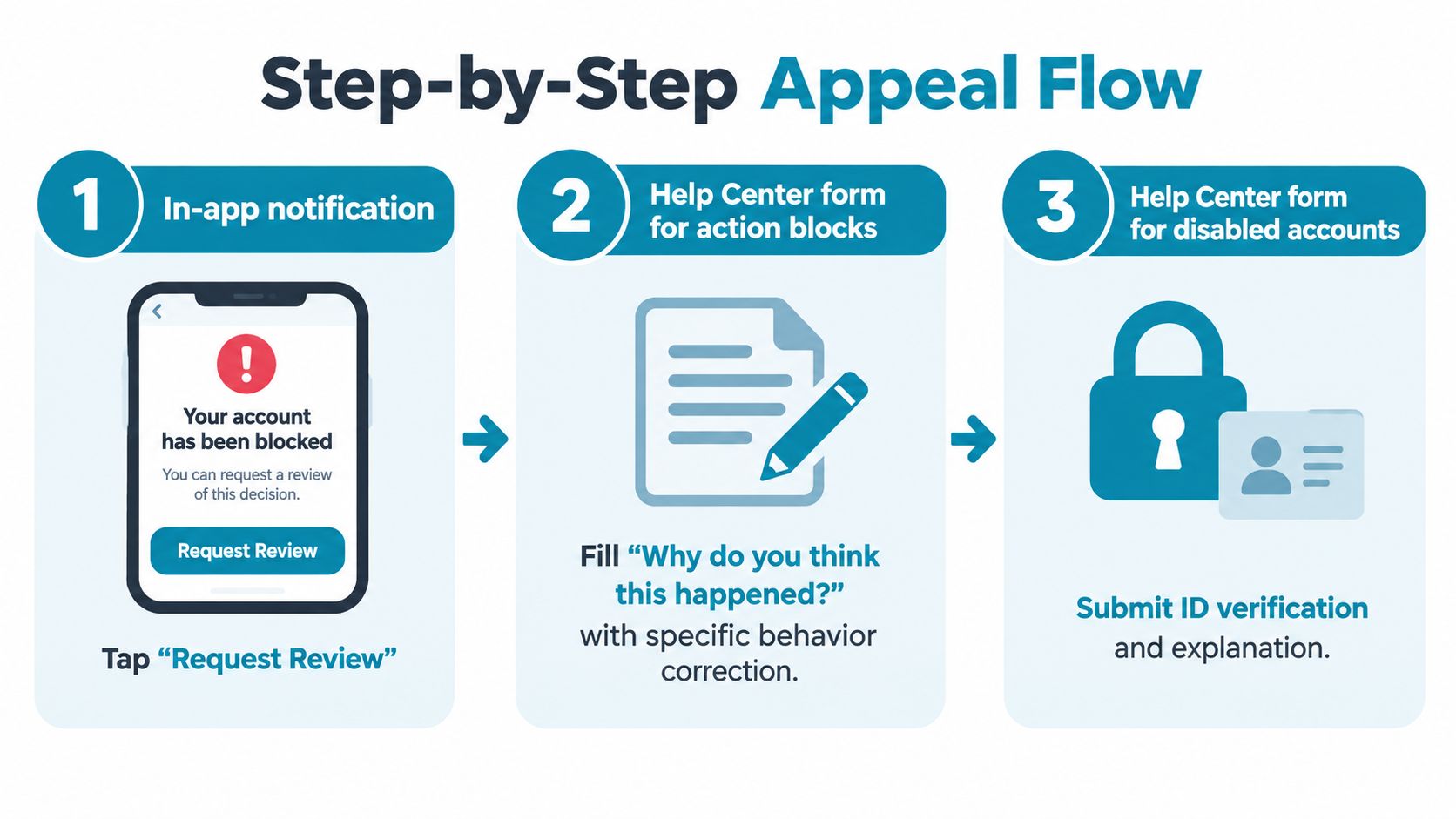
Start with the notice inside Instagram. If the app presents Request Review, use that route first. For an action block or disabled account, use the relevant Help Center form rather than sending unrelated reports through several categories.
The appeal should give a reviewer something specific to verify:
- Identify the account precisely. Provide the exact username and the email address or phone number connected to it.
- Record the trigger. Include the date and time of the suspected action, along with the feature that was restricted.
- Explain without ranting. Write one short paragraph describing what happened, what you were doing, and what you changed.
- Attach relevant verification. A government ID may be required for some disabled-account recoveries. For an action block, identity documentation may be useful when Instagram requests it.
- Save the submission. Keep the notice, confirmation, and appeal history so you can refer to the same facts later.
Write for review, not persuasion
Don't copy a dramatic paragraph from a forum. Don't claim that Instagram “owes” you access. State the action, the notice, the account details, and the reason you think the restriction is mistaken. If you used a third-party automation or growth tool, say so accurately and remove the source of the problem before appealing again.
A wrong email address can send the request away from the account that needs review. A canned paragraph can also look like the same low-quality complaint submitted repeatedly. Accuracy beats volume.
If the first response is a templated denial, keep the documentation and use the available Meta Support Inbox route for escalation. The TiedSiren contact page is relevant only if your problem is self-imposed Android app access, not an Instagram appeal.
Removing the Behavior That Triggered the Block in the First Place
Treat an action block as a warning about behavior, not as a puzzle asking for a clever bypass. Stop the activity that preceded it, review the account for connected tools, and return to ordinary use only after the restriction has cleared.
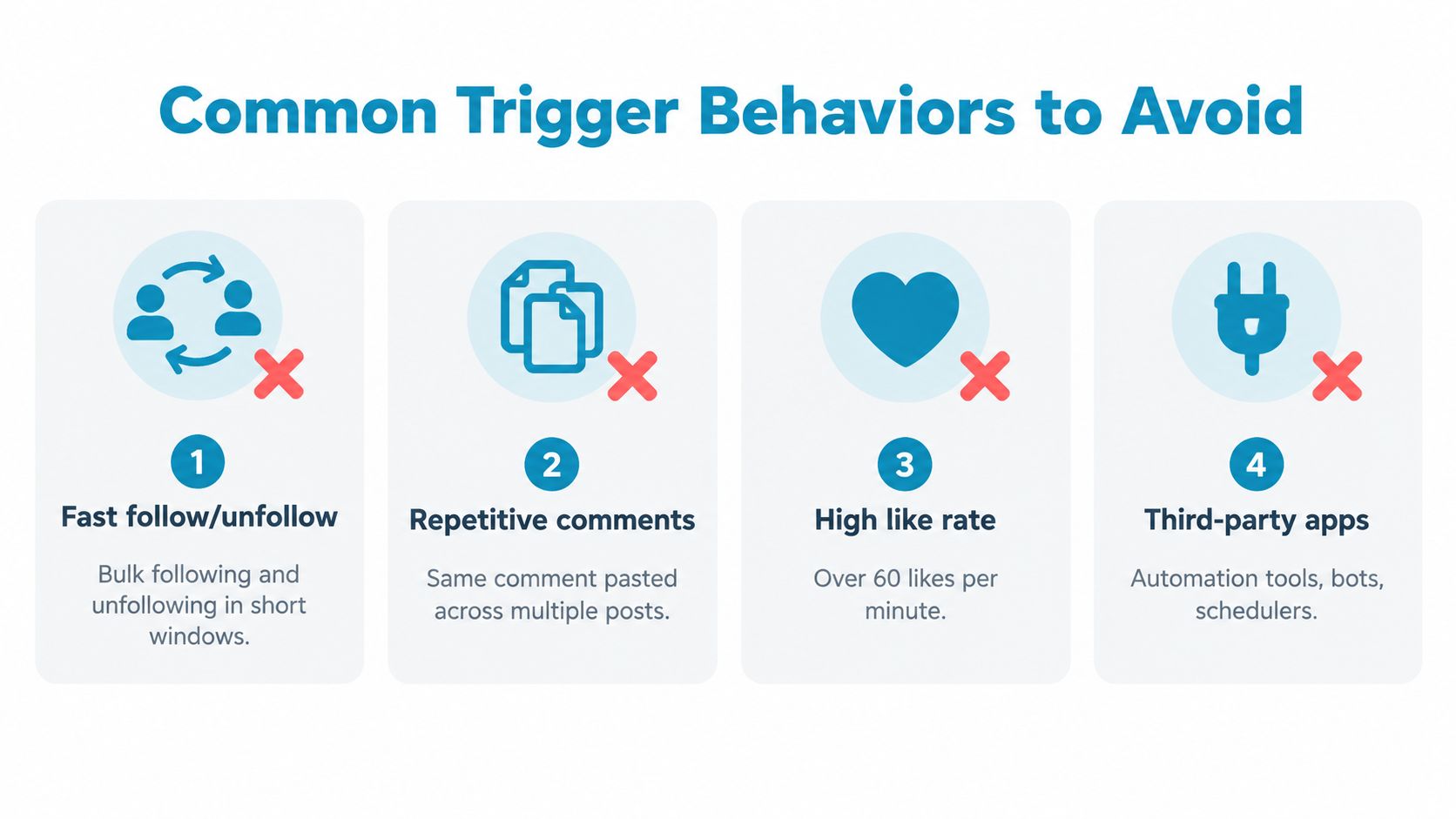
Common triggers include:
- Fast follow and unfollow activity: Large bursts look unlike normal conversation.
- Repetitive comments: Pasting the same comment across hashtag posts creates an obvious spam pattern.
- Repeated direct outreach: Similar messages sent to many people can draw scrutiny.
- Third-party automation: Bots and unauthorized growth tools can produce activity you didn't personally initiate.
- Rapid posting from a new account: A new profile that immediately behaves like a high-volume operator attracts attention.
The platform's limits are dynamic rather than fixed. Reporting on Instagram restrictions says repeated suspicious activity can make blocks last longer, while slower and less irregular use is less likely to trigger limits. Don't try to “test” the block every few minutes. Every test can become another signal.
Review your authorized apps and scheduled tools inside account settings. If the block involves content that violates Community Guidelines, remove the offending content where possible and use the appropriate appeal route. A technical workaround won't repair a policy violation.
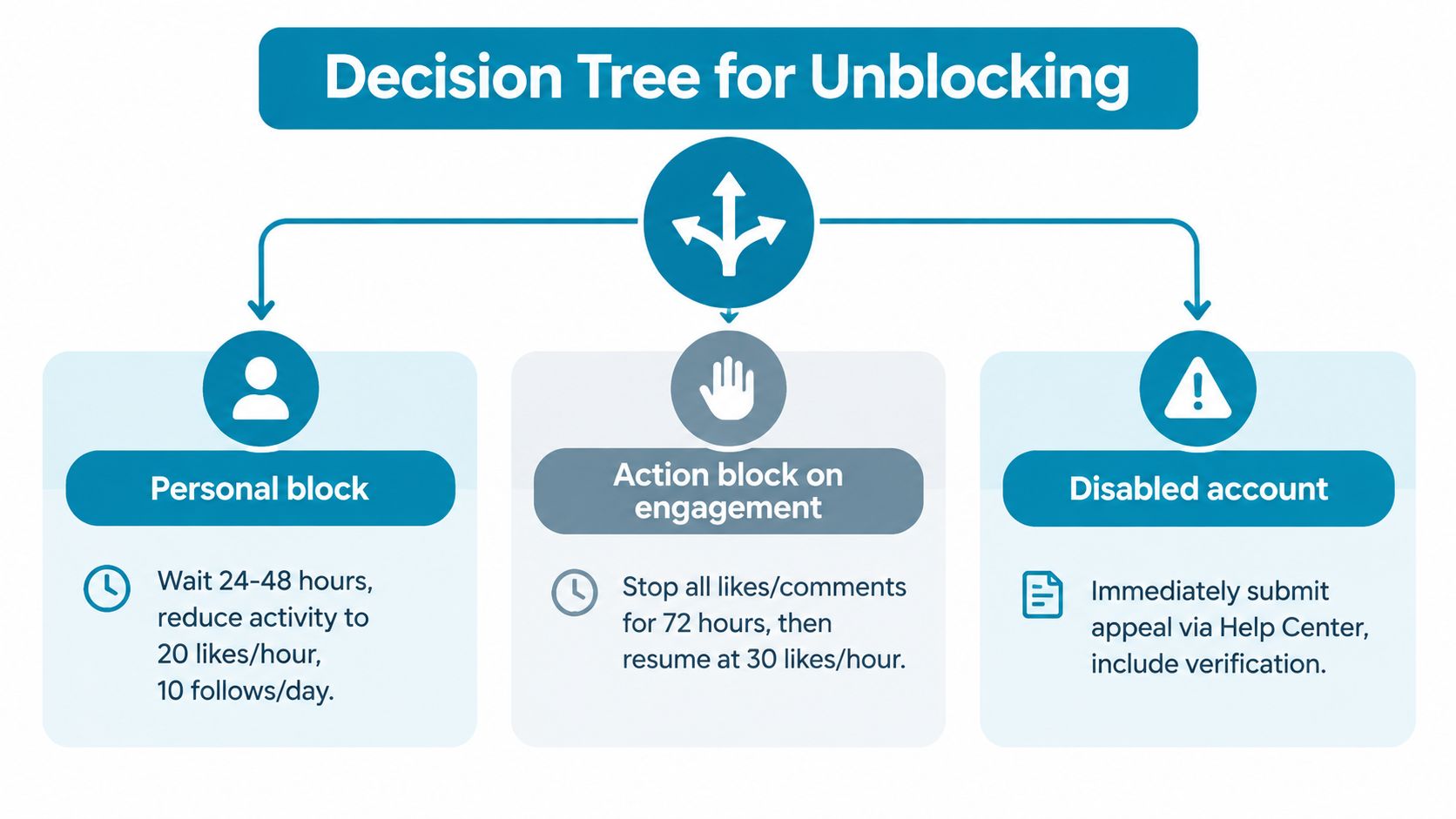
Which Path to Take Based on Your Situation
If one person blocked you, stop looking for a technical route around it. Respect the decision. A second account, proxy, or anonymous viewer may create a larger personal and platform problem.
If Instagram has blocked a specific action, pause the behavior, read the notice, and submit an in-app review when you believe the restriction is wrong. Measure the pause in days, not minutes. Use the account normally only after the restricted activity has stopped and the notice has cleared.
If Instagram disabled the account, collect the exact notice, account details, identity documentation where requested, and your appeal history. Recovery may take time, may require more than one review step, or may not succeed. If your income depends on Instagram, start building another channel instead of treating one account as an irreplaceable business asset.
The win isn't beating a block this afternoon. It's keeping the account usable long term and removing the reason you keep reaching for a bypass.
If Instagram keeps winning because the off switch is one tap away, TiedSiren lets you choose Instagram in a custom Android blocklist, commit to a timed session, and use Strict Mode while the countdown runs. It also blocks the Android Settings screen during the session, adding friction against the impulsive five-second undo.