

You sit down to write a report, pick up your phone to check one thing, and look up much later with nothing written. A Pomodoro timer gives the work a clear boundary, but it can't stop you from reaching for the phone when an interruption arrives or a break starts to drift. The timer method works with any phone, computer, or kitchen timer; TiedSiren is an Android app, which I'll cover below.
The 25-Minute Cycle and Its Timings
The standard Pomodoro cycle pairs one defined task with a focused work interval, a short break, and a longer recovery break after four work blocks. A Morgan State University student-success guide describes the standard pattern as 25 minutes of work followed by 5 minutes of rest, with a 20-to-30-minute break after four Pomodoros.
| Interval | Work | Break after | Notes |
|---|---|---|---|
| Pomodoro 1 | 25 min | 5 min | Name the task and its deliverable first |
| Pomodoro 2 | 25 min | 5 min | Same task, or the next item on the list |
| Pomodoro 3 | 25 min | 5 min | Log every interruption on paper |
| Pomodoro 4 | 25 min | 20–30 min long break | Cycle complete |
| Full cycle | 100 min | 35–45 min | Four work blocks, then the long break |
Those four work blocks add up to 100 minutes of focused work. The three short breaks plus the long break make 35 to 45 minutes of break time, so the full cycle takes 135 to 145 minutes. The longer break follows the fourth work block, not each individual one.
The timer is only one part of the routine. Before each block, decide what you're doing and what will count as finished. “Work on the report” is hard to assess; “draft the introduction and first section” gives you something concrete to check when the timer rings.
Write the cycle's end time on paper before the first block starts. That fixes the schedule before a notification, a request, or a sudden urge to check your phone can renegotiate it.
Choosing an Interval That Fits the Task
25 minutes of work and 5 minutes of rest is a useful default, not a proven best interval for every person or task. The practical choice is a length you can start and sustain without making breaks so frequent that they interrupt your work.
| Work / break (min) | Source | What it reports |
|---|---|---|
| 25 / 5 | University student-success guide | Standard baseline, with a 20-to-30-minute break after four blocks |
| 30 / 10 | University of Derby guidance | A longer block for tasks that take time to settle |
| 45 / 15 | University of Derby guidance | Complex work that needs a long uninterrupted stretch |
| 12 / 3 | 2026 study of 176 university students | Fixed cycles showed no significant difference in reading comprehension from self-chosen breaks |
Use 25/5 when a short, clear work window helps you begin or when distractions tend to pull you away. Try 30/10 if you need time to settle into a task, and 45/15 when writing, coding, or working through a problem benefits from a longer stretch. The 12/3 schedule offers a shorter option, but the study found no significant reading-comprehension difference between fixed cycles and self-chosen breaks.
A separate 2025 study of 87 university students found no overall difference in productivity, task completion, flow, fatigue, or motivation between fixed 25/5 blocks and self-regulated breaks. A timer can give your work a repeatable rhythm; it doesn't guarantee better results.
Test one interval length for a week. Each day, log completed blocks and how tired or distracted you felt, then keep the length that helps you finish more useful work with less fatigue. Choose the interval before you begin, not midway through a block when attention dips.
How to Run One Pomodoro, Step by Step
The timer protects a work block only when you define the block before it starts. Set up the task and your surroundings first, so the countdown doesn't become another thing you keep renegotiating.
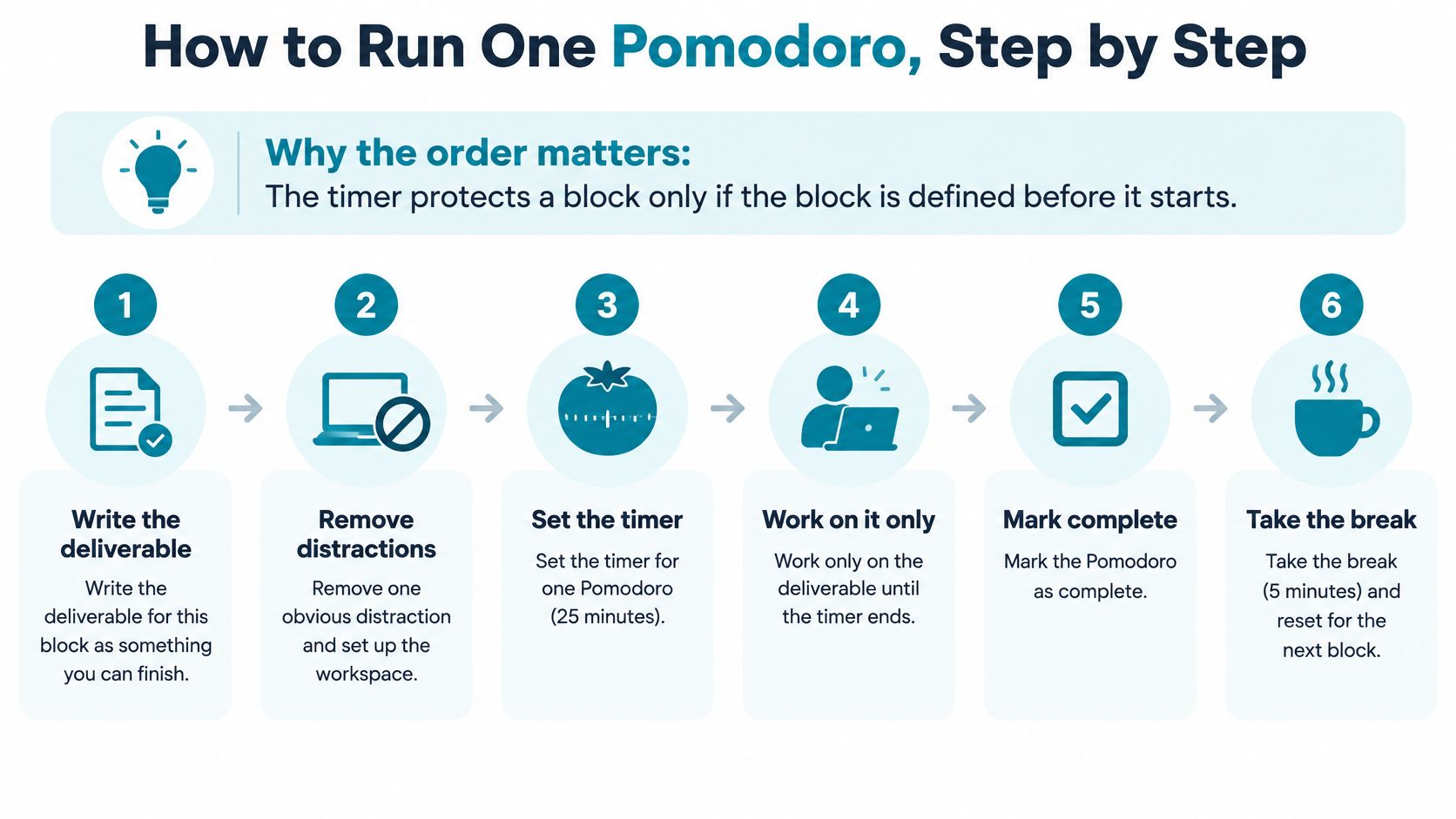
Write a checkable deliverable. Choose an outcome you can verify, such as drafting one report section or finishing a set of practice questions. “Study” doesn't tell you what to do next or whether the block produced anything.
Choose the interval and clear the workspace. Use the work length you selected for this task, then close unrelated tabs, silence notifications, and put your phone out of reach. Removing easy distractions before the timer starts is simpler than resisting them once you're working.
Start the timer and stay with the deliverable. Work on that task until the timer rings, without switching to unrelated work or checking messages. If another thought comes up, jot it on paper and return to the task.
Stop when the timer rings. Even if you're mid-sentence, mark the next action on paper so you can resume without having to remember where you left off. A clear stopping point makes the break easier to take without losing your place.
Mark the completed block. Add a tally and note what you produced, rather than counting only the time spent at your desk. Repeat the cycle for the next block, keeping the task focused and specific.
Take the planned break and reset. Use a timed short break between blocks, then take the longer recovery break after the fourth. Decide whether to start another cycle once you've rested, instead of letting a break turn into an unplanned phone session.
Keep a simple log for each block: whether you completed it, how many interruptions occurred, and what you finished. That record helps you adjust the task or interval based on results, not just on how focused you felt.
Use this visual sequence as a quick reference while setting up a block.
Handling Interruptions and Breaks That Run Long
The most familiar failure comes at the break: you pick up the phone, open a feed, and return much later than planned. The timer can mark the boundary, but it can't choose what you do once the screen is in your hand.
Guidance from Emory University Libraries based on the original method treats a work interval interrupted before the timer rings as incomplete. Its practical advice is to record distractions for later instead of following them during the block. That doesn't mean every unexpected event needs the same response. Ignore notification noise when you can, defer a request that can wait until the break, and end the block if a genuine emergency needs your attention. Log the interruption, then decide whether to resume or restart.
| Symptom | Likely cause | Fix |
|---|---|---|
| Break turns into a scrolling session | No break activity chosen before the timer starts | Pick a walk, water, or a stretch before starting the block |
| Interruption ends the whole cycle | Treating every interruption as a failed block | Decide before the session whether to resume or restart |
| Break runs past 5 minutes | No separate alarm for the break end | Set a separate alarm for the break |
| Block never starts | Interval too long for the task | Shorten the block, such as to 15 minutes, and keep the break |
| Block ends with nothing to show | Task was vague | Write one checkable deliverable before starting |
A break needs a boundary of its own. Pick the activity before the timer starts, and use a separate alarm if you tend to lose track of time. Walking, stretching, or getting water gives you a clear action that doesn't involve opening the apps that pulled you away.
When no Strict Mode timer is running, you can pause blocking or uninstall TiedSiren. During a focus block, the useful choice is to record a recoverable interruption and return to work, rather than treating every disruption as proof the whole cycle has failed.
Enforcing Pomodoro Sessions on Android
A timer can mark the end of a work block, but it cannot stop you reaching for a distracting app. TiedSiren is a free Android app blocker for Android 8.0 and later. Choose the apps to block, set a duration, and start a session. While the session runs, those apps and websites will not open.
Strict Mode makes the timer a commitment device: the session cannot be cut short, and the block remains active until the timer ends. Strict Mode requires TiedSiren Pro, a subscription sold through Google Play. The focus timer shows how much time remains, while recurring sessions can start automatically on a daily or weekly schedule.
Set up a block that matches the work
Make a work blocklist. Add the apps that tend to pull you away, such as social feeds, video apps, and games. A specific list keeps the block focused on the distractions you want out of reach.
Choose a focus-session duration. Set the duration before starting, so the timer matches the work block you planned. Check the remaining time on the focus timer rather than opening another app.
Turn on Strict Mode before starting. Once the session begins, blocked apps and websites will not open, and the timer cannot be cut short. Strict Mode requires TiedSiren Pro, sold as a subscription through Google Play.
Schedule your usual work hours. Set a daily or weekly recurring session to have the block activate automatically. This removes the need to make the same blocking decision each time.
Keep separate lists for different contexts. Maintain work, study, and sleep blocklists side by side, then switch between them as your needs change. Different lists let you block the apps that matter for each kind of focus.
If you tend to undo a block through Settings, enable the optional Settings lock before the Strict Mode timer starts. It keeps the Settings app closed, including the Wi-Fi, Bluetooth, and permission screens, until the timer ends. It adds friction to an impulsive attempt to disable blocking, but it is not an absolute lock: a determined person may still find another route. Choose the blocklist and settings before the session begins.
Start Your First Pomodoro Session Today
Start with a task, not an app. The timer works best when you know what it's meant to protect.
First, choose one task for tomorrow morning and write its deliverable in a sentence you can check. “Draft the opening section” gives you a clearer target than “work on the report.”
Next, run three full cycles this week using the timings in the first table. Count completed work blocks each day, and note what you finished so you can tell whether the routine fits your actual work.
Then, if the phone keeps breaking those blocks, install TiedSiren, an Android app for Android 8.0 and later. Get it from the Google Play listing or TiedSiren's download page, then make a work blocklist and schedule a work window to repeat on the days you work.
Write tomorrow's deliverable on paper now, in one sentence you can verify when the timer rings.
TiedSiren blocks the Android apps you choose for a session you commit to up front, and its focus timer shows the time remaining. If that extra friction would help your Pomodoro blocks hold when you reach for your phone, visit TiedSiren.