

You're halfway through a problem set. The answer to one small step is one tap away, so you reach for your phone. A notification badge appears. You check it, open the thread, answer one message, and tell yourself you'll put the phone down after one more look.
Twenty minutes later, the textbook is still open to the same page.
Learning how to focus on homework isn't mainly about discovering another concentration trick. Most students already know they should put the phone away. The harder problem is that the off switch sits within reach when the urge arrives. The useful fix is to change the environment before that moment, then make the distraction expensive enough that an impulse has time to fade.
The Moment the Phone Wins
The failure usually begins in a subtle way. You're working through a difficult equation, rereading a paragraph, or trying to remember what the teacher meant by a diagram. The task feels slightly uncomfortable, and the phone offers an immediate change of state.
The first thought sounds harmless: “I'll check for two seconds.” Then it becomes five minutes. A new notification leads to a thread, the thread leads to another app, and the original task begins to feel harder because you've broken the mental context needed to continue.
This isn't a character flaw. It's a predictable result of low friction. The phone is already charged, ready to use, nearby, and full of rewards that arrive faster than homework does. Willpower has to defeat a reflex while you're tired or frustrated. That's a poor design for sustained work.
Practical rule: Don't ask your tired self to make the same decision every few minutes.
The behavior is measurable. An ERIC-indexed study of teen homework behavior found that students were distracted during homework about 38% of the time. In the same sample, 58.5% reported mind-wandering often or very often, 40.0% said they used their phone to multitask often or very often, and 65.2% said their families had no rules restricting phone use during homework.
Those figures don't prove that every student needs total phone removal. They do show why “just focus harder” is a weak plan. Attention depends on the device, the room, household expectations, and the number of times you have to renegotiate your own decision.
The approach that works better is mechanical. Clear the room of easy distractions, define a short piece of work, and start a phone block before the first difficult moment. You're not trying to become someone who never wants to check the phone. You're arranging things so the automatic check doesn't succeed.
Set Up the Room Before You Sit Down
A short room reset is more useful than a motivational speech. Do it before opening the textbook, while the decision to work still feels easy.
Remove the obvious handles
Clear the desk until it holds one subject, one open page, one writing tool, and a filled water bottle. Put the phone face-down in another room. Silent mode on the desk still leaves the phone available, and availability is enough to trigger a reach.
Close every browser tab unrelated to the current assignment. If you need online research, collect the necessary links in one note before starting, then close the search tabs. This turns research into a defined task instead of an excuse to browse.
Sign out of messaging apps on the laptop. Keep the computer available for schoolwork, but remove the accounts that turn a document window into a social inbox.
Make the body less restless
Set the desk lamp to warm light if that feels easier on your eyes. Raise the chair so both feet touch the floor flat. Keep water within reach so thirst doesn't become a reason to wander, but don't build a snack station that creates repeated trips away from the work.
These changes don't improve focus through positive thinking. They remove small interruptions and reduce the number of physical choices you'll make once the session starts.
A useful reset looks like this:
- Desk: Keep only the materials for the current subject.
- Phone: Place it outside the room, or prepare a timed block before sitting down.
- Laptop: Leave the current class document and required research open, then close everything else.
- Body: Adjust the chair, light, and water before the first task begins.
The OECD describes the trade-off clearly in its 2024 analysis of screen time in education. Productive device use can support learning, while unmanaged leisure use and distraction are associated with weaker mathematics performance. The point isn't to remove every screen. It's to separate the screen needed for the assignment from the screen that keeps offering unrelated rewards.
Timebox the Work Without Faking It
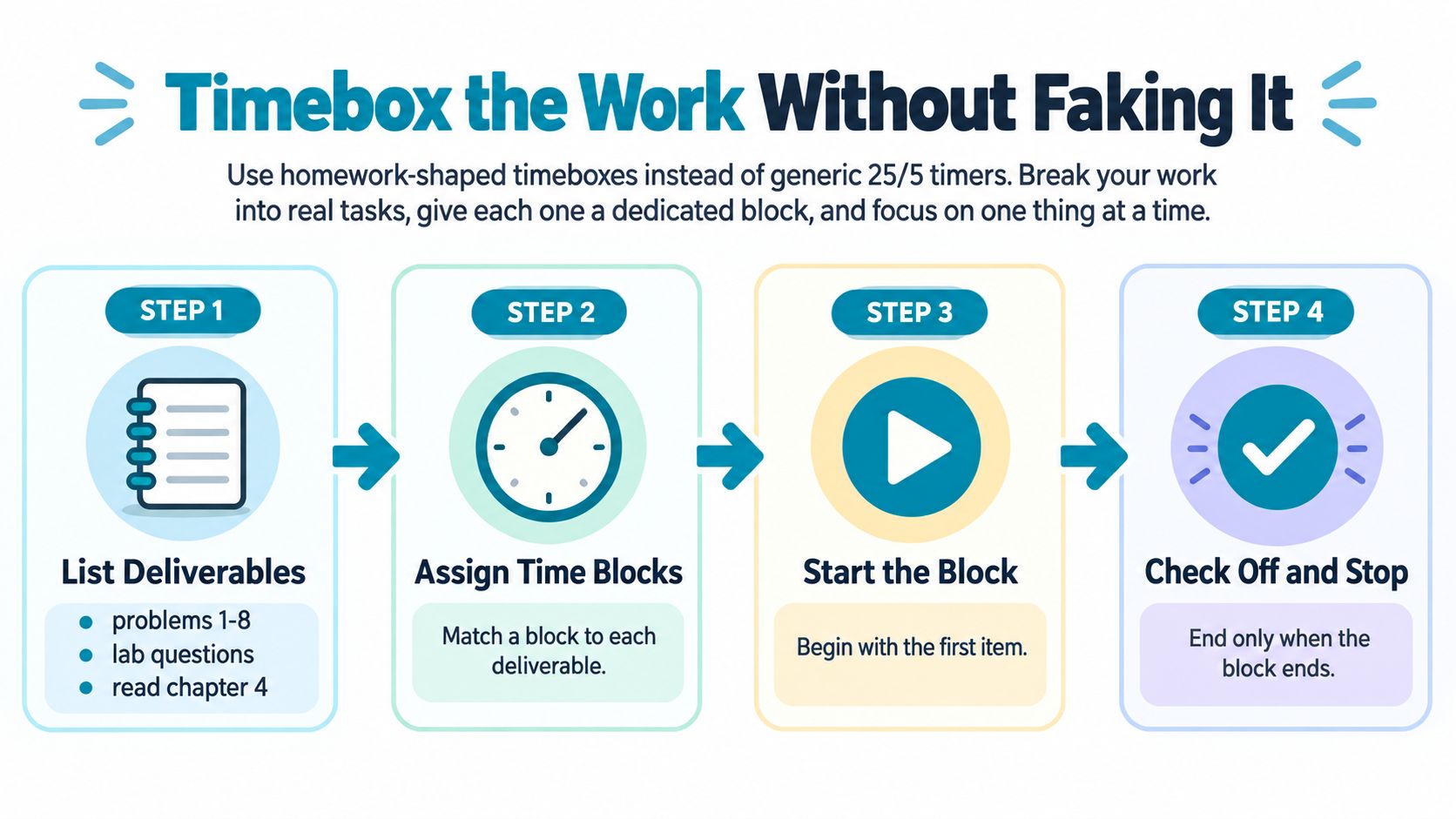
A generic timer that says “study for twenty-five minutes” can be too vague for homework. Use a homework-shaped timebox tied to something you can finish or assess.
Write the actual deliverables first:
- Problems 1 to 8
- Lab questions
- Read chapter 4
Then assign a realistic block to each item. The timer should answer, “How long will I work on these lab questions?” rather than, “How long will I vaguely study?”
Start the first deliverable and stay with it until the block ends. When it ends, stand up for a real break, drink water, and avoid screens. If the task runs over its budget, mark the stopping point and carry the unfinished part into a later session. Don't absorb the overrun and let every later task disappear.
Use the timer as a boundary
A useful timebox has four parts:
- Output: Name the work, such as “complete problems 1 to 8.”
- Duration: Choose a block that matches your energy and the difficulty of the task.
- Stop point: End when the block ends, even if you haven't completed everything.
- Next action: Write what you'll do when you return, such as “check problem 6 setup.”
This system prevents “studying” from becoming an activity with no visible finish line. It also gives you information. If the same type of assignment repeatedly overruns, the problem may be the estimate, the prerequisite knowledge, or the task itself. You can adjust the next block instead of blaming your concentration.
The student study-habits research supports active, distributed study over passive rereading or cramming. Students in that study used about four active strategies on average, spent about half of their study time using active strategies, and the amount of active study predicted exam performance. They were also distracted for about 20% of study time, with 61% distracted for more than 10% of their study time.
For practical purposes, that means your timer should contain retrieval, problem-solving, self-testing, or written answers. A long block of rereading gives distraction plenty of room to hide.
Use TiedSiren's feature overview if you want to match an app block to the same written timebox.
Why Willpower Blockers Fail at the Urge
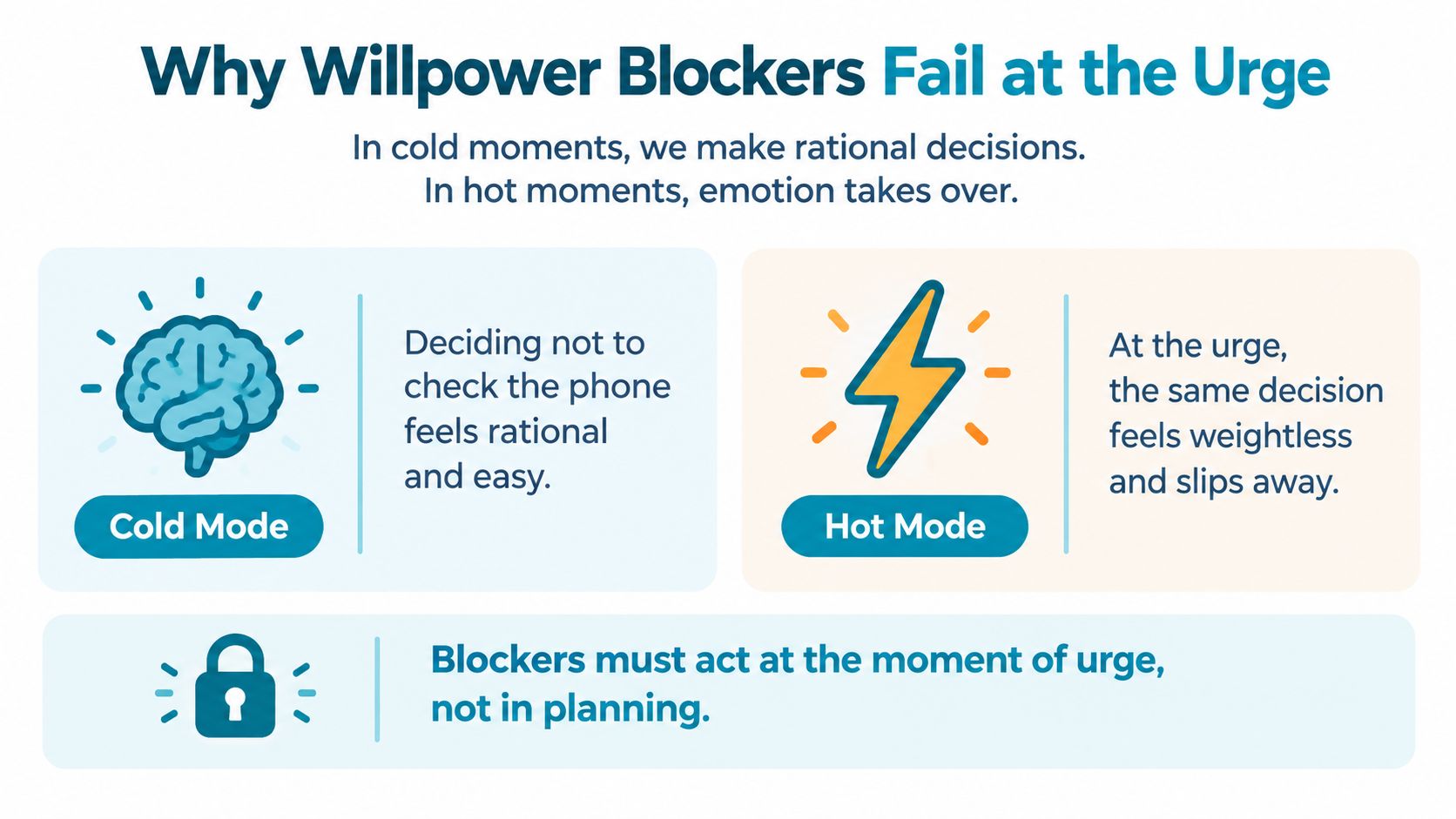
The decision not to check your phone usually happens in a calm moment. You install a blocker, choose sensible limits, and feel certain you'll follow them. The decision to disable it happens later, during a difficult paragraph or a frustrating problem, when the reward of checking feels more valuable than the plan you made earlier.
That difference matters. A soft blocker may show a warning, present a countdown, or offer a “just five minutes” option. Each one leaves the final decision in the hands of the person currently experiencing the urge. At that point, the argument has already changed.
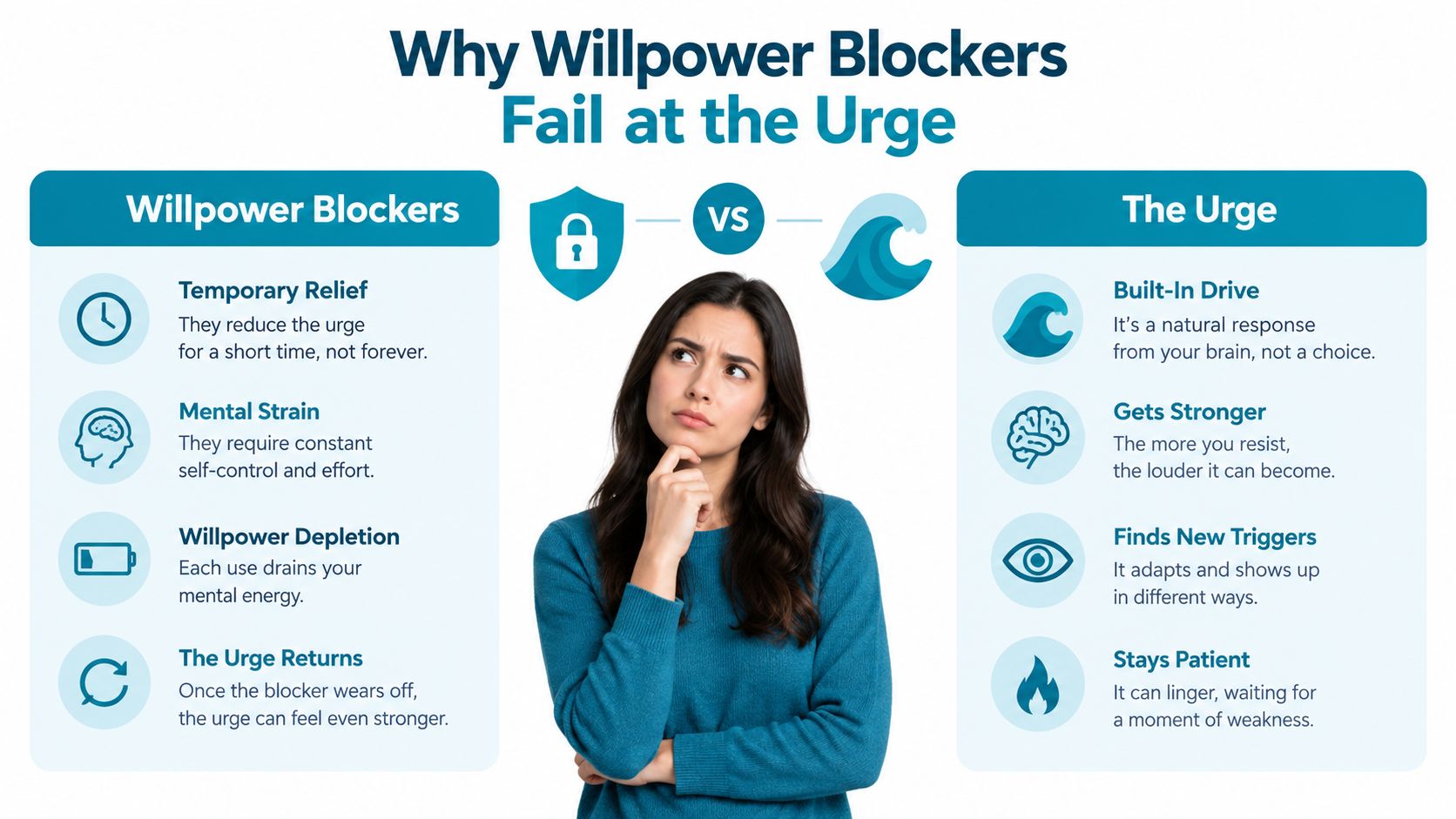
The strongest blocker isn't necessarily the one with the most warnings. It's the one that changes the cost of acting. If disabling the block takes several deliberate steps, the impulse has to survive long enough to complete them. That delay creates room for the original task to become possible again.
A 2025 University of Michigan field study on smartphone friction found that making tapping and swiping slightly annoying was about 16% more effective at reducing screen time and app opens than fully locking users out. The study involved 42 participants over five weeks. That doesn't mean friction solves every phone habit. It does support a practical distinction: making the unwanted action harder can work differently from presenting a prohibition.
The same logic applies to homework. Don't rely on a future, calmer version of yourself to overrule the version who is forty minutes into a hard assignment. Decide before the session, then put the block between the impulse and the app.
The aim isn't an absolute promise that no determined person could ever undo the setup. The aim is to defeat the impulsive bypass, the one completed in five seconds without planning.
Lock a Session That Ends on the Timer
A useful locked session has a clear beginning, a fixed end, and no mid-session renegotiation. Pick the homework window first. Make it realistic for the afternoon you really have, not the ideal version of yourself who never gets tired.
Then select the applications that create the problem. You might block social feeds, video apps, games, or messaging tools while keeping the applications needed for the assignment available. TiedSiren supports custom blocklists grouped by context, so a study list can be separate from lists used for work or sleep.
Build the session before the urge
Set the duration before starting. The session should be long enough to complete a defined deliverable, but short enough that you can accept the commitment without immediately looking for an escape.
A practical setup has these parts:
- Blocklist: Choose the apps that pull you away from the assignment.
- Duration: Match the session to one homework deliverable or a realistic work window.
- Strict Mode: Start a running session whose timer is the controlling endpoint.
- Settings friction: TiedSiren blocks the Android Settings screen while the session runs, raising the cost of turning the block off.
- Timer: Keep the remaining time visible so the end isn't a surprise.
The distinction between a reminder and enforcement matters. A 2021 academic manuscript on screen-time blocking describes a blocking app as one that automatically and strictly blocks selected apps after a daily usage limit is reached, rather than merely reminding the user. For homework, the same principle means the decision happens before the assignment, not at every point of friction inside it.

Use recurrence when the pattern is predictable
If homework happens at a regular time, scheduled sessions with daily or weekly recurrence remove another decision. You don't have to remember to create the block after you're already distracted. The schedule starts the session according to the routine you chose.
TiedSiren runs on Android 8.0 and later, and its download page provides the app for that platform. The product's strength here is the friction around the impulsive off switch. Strict Mode keeps the running session tied to its timer, while blocking Settings makes the fastest route to disabling the block less convenient.
After the session ends, don't immediately open every blocked app. Stand up, leave the desk, and decide whether you're taking a break or starting another defined deliverable. The timer should create a boundary, not turn the end of homework into an automatic scrolling session.
When Starting Is the Real Problem
Many students describe the issue as distraction, but the first failure often happens before any real work begins. The laptop is open, the notebook is ready, and the assignment is visible. Then you switch tabs, get water, check one message, reorganize the desk, and search for a better explanation of the task.
The drift can consume the whole opening of the session. A study-planning study on implementation intentions found that distraction or getting derailed was the most frequently reported obstacle at 42.3%, followed by failing to get started at 36.2%. Students who formed a plan for the distraction obstacle later reported less distraction. The study also cites homework behavior in which students stayed focused only 62.2% of the time.
Starting feels difficult when the assignment is represented as one large demand. “Finish the history essay” is too big to begin cleanly. “Write the first claim and one supporting sentence” gives your brain a visible first move.
Shrink the entry point
Write one concrete output at the top of the page:
- Complete the next three problems.
- Write the opening paragraph.
- Turn the class notes into five questions.
- Read two pages and record the main claim.
Then set a short starting block, perhaps ten or fifteen minutes. Those durations are practical choices, not performance promises. The point is to make beginning smaller than avoidance.
Lock the phone before the start cue, not after you've already struggled. Once the phone is unavailable, the next action is simpler: write the first line, solve the first step, or read the first section. You're removing negotiation at the exact point where negotiation creates delay.
Your Repeatable Homework Routine
A repeatable homework routine should remove decisions before work begins. Reset the room first: clear the desk, plug in the laptop charger, close non-class tabs, fill the water bottle, and open the notebook to today's task list. The goal is to make the next action obvious before you sit down.
Write the timebox at the top of the page with a specific end time. Include the deliverable, the stopping point, and the plan for unfinished work. A written endpoint prevents the session from expanding whenever the assignment feels difficult.
Before writing the first sentence or solving the first problem, start a strict phone session that matches the timebox. Choose the blocklist, set the duration, and use a recurring schedule if homework happens at predictable times. If you need a break between sessions, schedule separate work windows instead of making that choice while the urge is active.
The first win is not finishing. It's making the first action easier than another negotiation.
Put the first sentence or calculation on paper, then let the timer run. When it ends, leave the screen for a real break. Stretch, drink water, or walk around. A break that becomes scrolling moves the distraction outside the work window.
Each part handles a different failure:
- Room reset: Removes physical prompts and unnecessary choices.
- Written timebox: Converts vague studying into a defined output.
- Strict phone session: Raises the cost of an impulsive bypass.
- Small starting action: Reduces the friction of beginning.
- Screen-free break: Protects the boundary between work and recovery.
Repeat the sequence after a poor session as well as a good one. The routine becomes useful through reuse, not because every attempt feels productive. TiedSiren is one Android option for blocking chosen applications for a committed duration, with Strict Mode, scheduled sessions, custom blocklists, a focus timer, and Settings-screen friction during an active session.
Try the routine tonight with one clearly defined deliverable if your phone usually interrupts homework. Put the device under a timed block, write the first task, and give yourself a room where the next action is clear.
TiedSiren is a free Android app that blocks selected applications for a duration you commit to in advance, with Strict Mode and scheduled sessions for repeatable study windows. Visit TiedSiren's download page to set up a homework block that raises the cost of bypassing it before the next assignment begins.