You opened your phone to answer a message. Say the next forty minutes disappeared into clips, comments and another app you never meant to open. Now the unfinished task is still on the screen, and you're searching for ADHD phone addiction advice even though you already know how to set a limit.
The failure happened after you set it, when you turned the blocker off. TiedSiren is a free app for Android 8.0 and later, so the blocking advice here applies to Android phones. The reasoning applies more broadly, but the tool itself isn't for iPhone, Mac or Windows.
Why ADHD Makes Phone Overuse Harder to Stop
That message-checking scenario involves more than losing track of time. You had a task, an intention to return and probably a limit you wanted to keep. The difficulty was stopping an engaging activity once you'd started it, a pattern researchers measure rather than a character flaw.
A 2022 meta-analysis available through the National Library of Medicine found that, across nine studies using time-based measures, children and adolescents with ADHD spent significantly more time on digital media than age-matched controls, with a standardized mean difference of 0.31 and a 95% confidence interval of 0.07 to 0.55. Standardized rating scales also showed more severe problematic use; one included 2019 Korean community sample found adolescents with ADHD had approximately 10.14 times the odds of being classified as having addictive smartphone use.
What those findings mean for your limits
The important distinction is time spent versus control lost. A long, purposeful phone session and repeatedly opening a feed despite wanting to stop shouldn't be treated as the same behavior.
A 2024 article examining adolescents and young adults in Bangladesh summarized a South Korean study of 4,512 adolescents, where ADHD symptoms were reported by 47.8% of problematic smartphone users, compared with 19.7% of low-use students. Those are questionnaire-based group comparisons, not a diagnosis for anyone who recognizes the pattern.
- Watch the stopping point. Can you leave the app when you intended, or does each stopping point become another reason to continue?
- Watch the interference. Notice unfinished obligations, delayed sleep and repeated attempts to cut back, rather than judging yourself against an arbitrary screen-time total.
- Keep causation separate. The relationship may run both ways. These associations don't establish that phones cause ADHD.
A useful block addresses the moment you struggle to disengage. It doesn't establish why you have attention difficulties, and it doesn't treat them.
Phone blocking is behavioral support. Clinical ADHD symptoms and persistent sleep problems belong with a qualified professional, alongside whatever practical boundaries you choose for your phone.
Which ADHD Traits the Phone Plays On
| ADHD-related trait | How the phone exploits it | Where it shows up |
|---|---|---|
| Impulsivity | Small rewards arrive on a fast cadence | Opening an app you planned to skip |
| Difficulty delaying reward | Feeds pay out in seconds, work pays out later | Choosing the feed over the task |
| Task initiation | The phone is the easiest thing to start | Reaching for the phone before starting a hard task |
| Boredom sensitivity | Endless feeds fill every gap | Scrolling while waiting in line or at a stop |
| Attention switching | Notifications pull focus to new targets | Losing the thread of work after a ping |
| Interest-driven hyperfocus | Feeds keep interest going past the planned end | A session running well past the planned stop |
Impulsivity is the tap before you've considered whether you want to open Instagram. Difficulty delaying reward is the choice between an immediately interesting clip and an assignment whose satisfaction comes later. They can look identical on a screen-time chart, but they call for different boundaries.
Task initiation shows up before the work has begun. Boredom sensitivity shows up in empty gaps, including the pause while a document loads. Attention switching interrupts something already underway, while interest-driven hyperfocus can make a planned stopping point hard to act on.
Match the boundary to the behavior
In a study of adolescents and young adults examining executive dysfunction and smartphone distraction, ADHD symptoms correlated with smartphone distraction at r = 0.39 and academic procrastination at r = 0.48; a direct association with distraction remained after controlling for executive dysfunction and other measured factors. That supports paying attention to the behavior around a task, not merely recording daily phone use.
The adult pattern matters too. A study of 273 healthy adults aged 18 to 70, with a mean age of 31.37, found that higher inattention scores and younger age predicted greater risk of smartphone addiction and problematic mobile-phone use.
Neither study proves that ADHD causes phone addiction. These are vulnerabilities to work around, not explanations to impose on every person with ADHD.
Choose the two rows that best match your last three difficult sessions. If the problem begins before writing, block the tempting apps before opening the document; if it begins during waiting, protect those gaps rather than only your busiest hours.
What Each Phone Check Costs in Focus Time
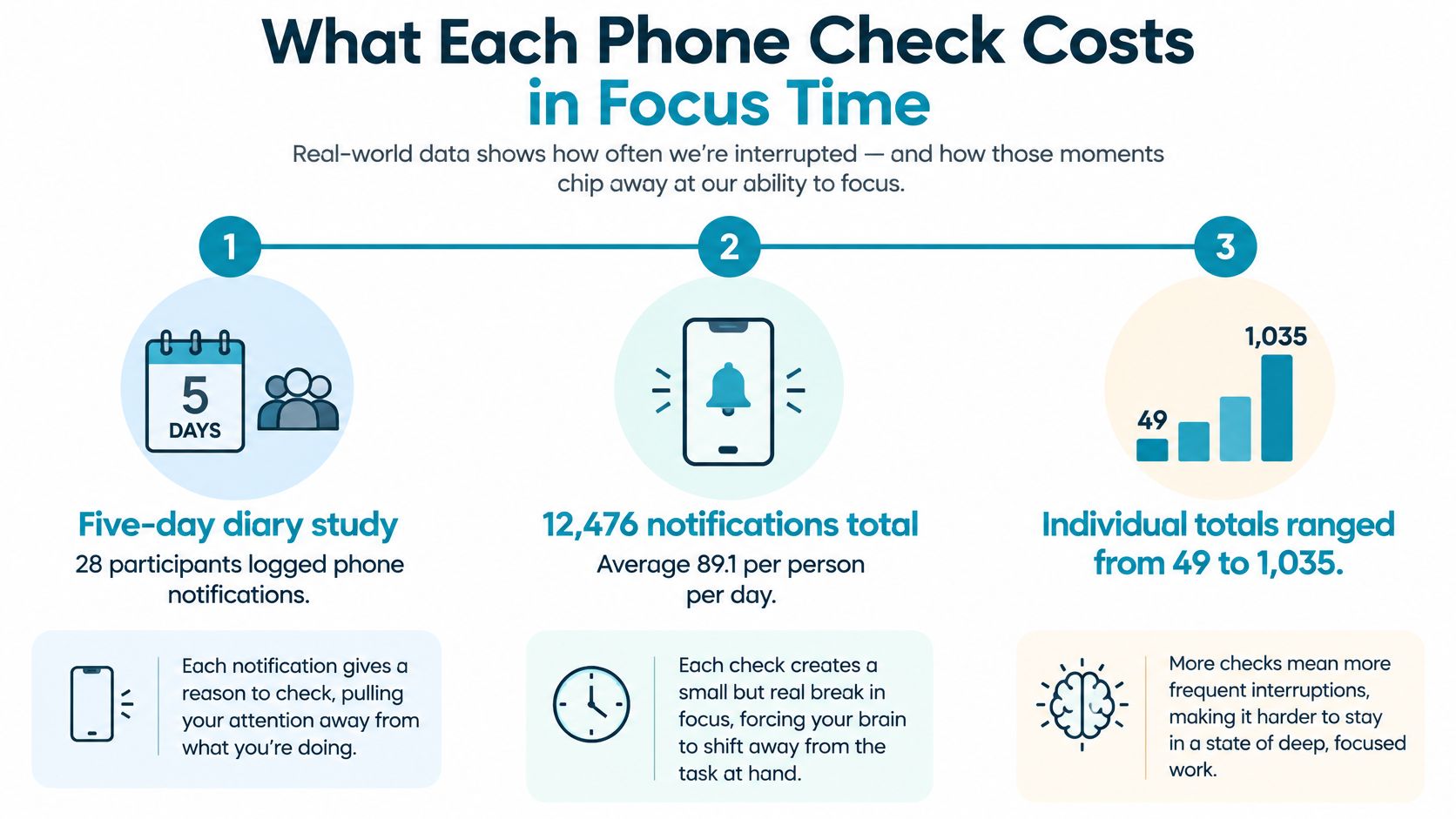
In a five-day diary study of smartphone notifications, 28 participants logged 12,476 notifications, averaging 89.1 per person per day, with individual totals ranging from 49 to 1,035. Participants most commonly reported focus periods of three to five hours, representing 40% of diary days.
That's a small sample, not a universal notification average. Its useful lesson is how unevenly prompts arrive and how many opportunities they can create to leave a task during a sustained work period.
Recognize the restart after the check
Use these stages as a practical description of your experience, not a clinical model or a fixed recovery schedule:
- Warm-up. You return to the document, but you're still locating the problem. You scroll to find your place, check the assignment or stare at the unfinished sentence.
- Attention ramp-up. You know where you were, but you haven't recovered the thread. You reread the paragraph, open an unplanned tab or check the clock while trying to decide what comes next.
- Flow. You're working on the task rather than repeatedly preparing to work. You can hold the next action in mind, and the phone stops being the obvious alternative.
A brief check can leave you back at warm-up. Even when the screen-time total barely changes, you may have to reconstruct the argument, calculation or code path you were holding before you looked away.
That restart is the cost worth noticing.
Measure useful work, not just elapsed time
Don't assign yourself a recovery time borrowed from a headline. Note when you return to the task, then when you produce the first sentence of real work, solve the next step or make a deliberate code change.
For work that doesn't produce text, define the marker beforehand. Reading might mean finishing a passage and summarizing its point without reopening the phone. Planning might mean making an actual decision rather than rearranging the same list.
A focus-time tracking approach can help you distinguish sitting at the desk from getting back into the task. Keep the tracking light enough that it doesn't become another interruption.
Turn down unnecessary prompts separately, then block the destinations you repeatedly open during the committed window. The aim is to protect continuity, including the fragile period when you've just returned, rather than merely lowering the minutes recorded against an app.
Why the Block Gets Switched Off at the Worst Moment
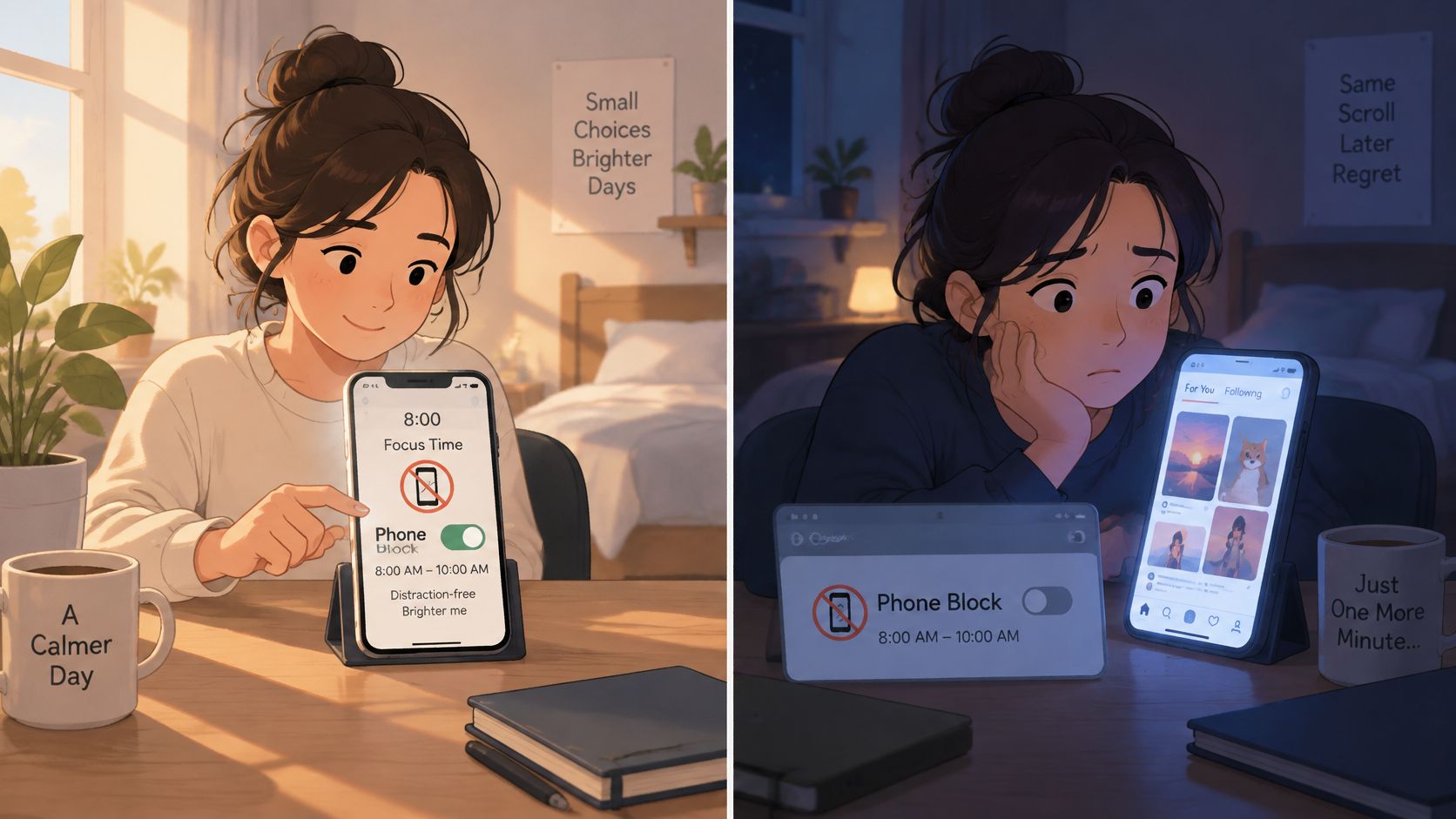
You set a sensible limit in the morning. Later, tired and already inside the feed, you decide today deserves an exception. The plan hasn't changed; the conditions have. In that moment, the easiest choice is often to keep scrolling.
A reminder asks you to make another decision while the app is already open. If dismissing it takes you straight back to the feed, it may identify the problem without changing what happens.
Immediate access changes the choice
In a smartphone-access experiment described by The Journal of Clinical Psychiatry's news publication, participants completed two five-hour knowledge-work sessions. When their phone was within immediate reach, they used it an average of 14 minutes longer and checked it nearly three times as often. Removing easy access didn't automatically increase total work time, because some non-work activity moved to computers.
That limit matters. Blocking Reddit on your phone won't stop you opening it on a laptop. A blocker changes access to selected distractions; it doesn't choose your next useful action. Before starting a session, leave the work in a state you can resume: open the document, write down the next action and move unrelated browser tabs aside.
Make the undo harder than the impulse
A blocker you can switch off in three taps is not a commitment device. TiedSiren's founder describes installing and uninstalling earlier blockers, each defeated in about a minute by opening Settings and turning the blocker off.
TiedSiren's optional Settings lock can keep the Settings app closed until the timer ends. Turn it on before starting the session. It raises the cost of an impulsive undo, but it is not an absolute lock against someone determined to bypass it.
A reminder suits a moment when you're willing to stop. A precommitted barrier suits the moment when you already know you should stop, but keep bargaining for an exception. The difference is whether access stays available while the impulse is strongest.
For practical ways to improve impulse control around phone use, make the decision earlier: choose the apps and window while you still agree with your plan. Once the feed is open, relying on another argument with yourself can leave the original plan easy to abandon.
How to Set Up Blocks That Hold
Start with a block you can explain in a sentence: the apps that derail this task will stay unavailable while you do it. Avoid designing an elaborate restriction system before you've tested whether the basic arrangement fits your day.
Build the session around a real task
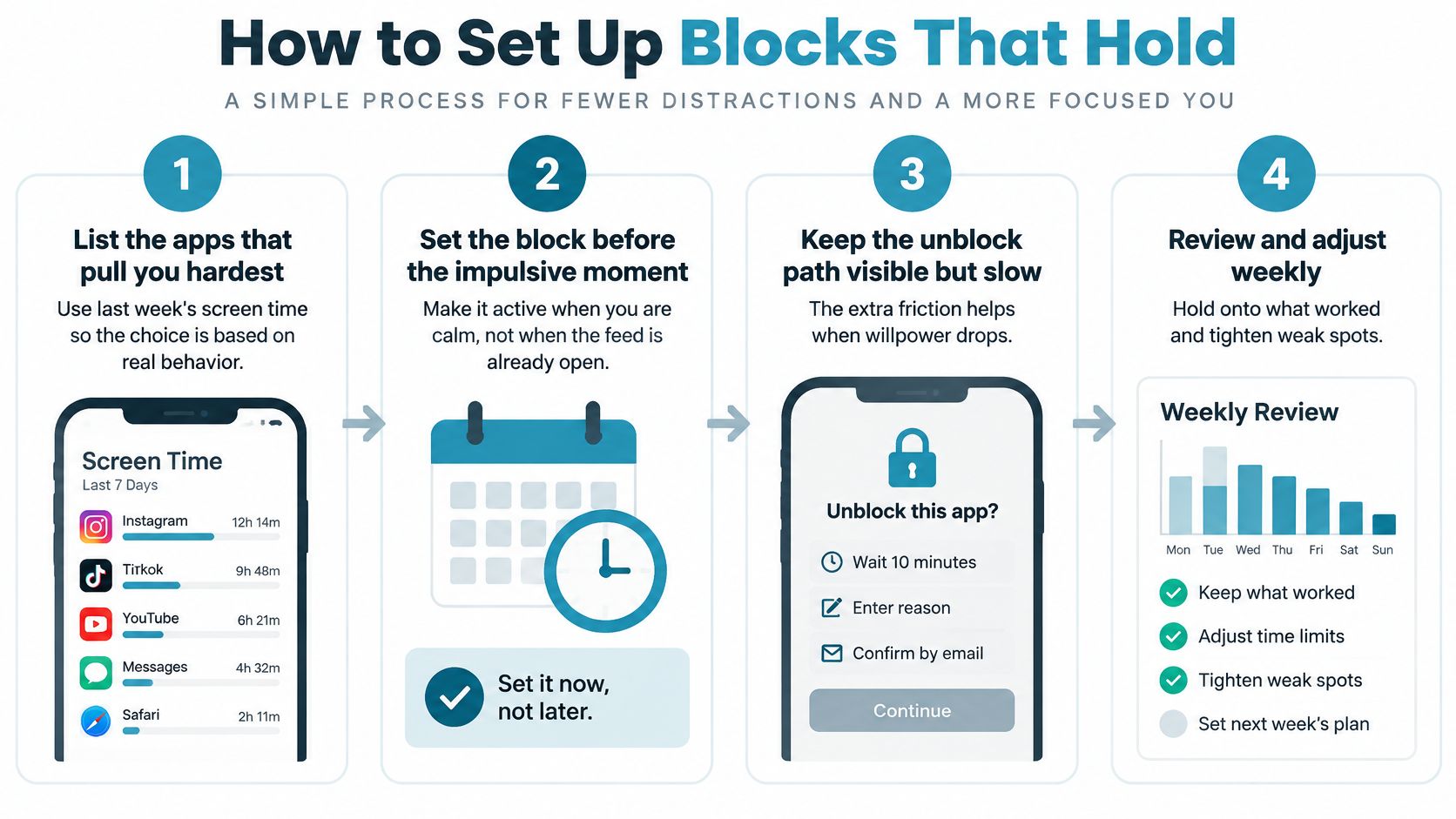
List the apps that pull you hardest. Use last week's screen-time breakdown to identify repeated detours, then include those apps in the initial block rather than restricting everything you might conceivably misuse.
Build a separate blocklist for each context, such as study, work and sleep. An app you need for a seminar may be the same app you repeatedly browse at bedtime, so don't force every situation into the same list.
Choose the duration before starting. In Strict Mode, a running session ends when its timer ends, and nothing else ends it; select a window you're prepared to keep rather than an ambitious duration you already resent.
Account for the Android Settings screen being blocked during the running session. Make necessary arrangements beforehand, so a predictable need doesn't turn your focus period into an attempt to undo the restriction.
Use the focus timer to see how much time remains. Let it answer a specific question about the session instead of repeatedly checking it as a substitute for working.
Schedule recurring sessions for windows that repeat, using daily or weekly recurrence. Anchor them to your actual routine rather than the routine you hope to have someday.
Review after a week. Compare sessions you completed with sessions you avoided starting or worked around elsewhere, then change the app list or duration instead of treating every difficulty as a reason to abandon blocking.
Leave yourself something clear to do
Before starting, identify the first visible action. For an essay, that might be drafting the argument beneath an existing heading; for exam preparation, it might be working through the next unanswered problem.
Also decide what a legitimate break looks like. Getting water or standing up doesn't have to become an attempt to retrieve the blocked feed.
A bounded block should leave room for the task's real requirements. If you need a messaging app to receive a document, arrange access before the session or leave that app out of the list.
A working block keeps the listed apps closed until the timer ends. You shouldn't have to rehearse your reasons for setting it every time the urge returns, but you still need a task that's clear enough to begin.
Adjusting Blocks for Study, Work and Sleep
Block the apps that create trouble in a particular window, not every interaction with the phone. Navigation, purposeful reading, group work and compulsive checking serve different purposes, even when they appear on the same device.
A meta-analysis of problematic digital-media use in children and adolescents supports distinguishing poorly controlled use from a universal daily screen-time threshold. For a practical experiment, make the boundary specific enough that you can tell what changed.
| Context | Apps to block | Session pattern | What to watch |
|---|---|---|---|
| Study window | Short-form feeds, games and messaging apps you open between tasks | A fixed session matching the study block | Whether you reached for the phone before the timer ended |
| Deep work | Social feeds, news and shopping apps | Recurring daytime session on workdays | How many breaks you wanted compared with how many you took |
| Wind-down before sleep | Video feeds and games | Daily recurring session starting before your usual bedtime | Time of your first unlock the next morning |
| Gaming limit | Mobile game apps only | Weekly session on the days you set | Hours played in the week after the first block |
| Shift or class with a phone need | Only the apps you don't need during the shift | Short session with the focus timer visible | Whether you asked for the phone during the shift |
Keep necessary access intentional
A student doing group work may need WhatsApp throughout a study session. Leave it out of that blocklist if it's essential, while recognizing that you'll need a separate agreement with yourself about unrelated conversations.
A shift worker may need the phone for work while wanting games unavailable. That's a reason for a narrower block, not evidence that blocking can't fit the job.
Use scheduled app blocking for predictable windows. Don't schedule an unsuitable block merely because the calendar makes it look tidy.
Read the signals without judging yourself
Reaching for the phone is information, not an automatic failure. Ask whether you needed a legitimate tool, wanted relief from the task, or acted out a familiar movement.
Adults and students who struggle with inattention may find shorter initial windows more workable. That's a practical adjustment, not a prescribed ADHD-specific duration.
The table's watch column gives you something concrete to review, but none of those signals proves better sleep or productivity on its own. Change one row at a time, and keep the arrangement you can follow for a week.
Confirm the Block Before Your Next Session
Before you start, give the session a clear purpose: draft an introduction, complete practice questions or keep video feeds out of your bedtime routine. Choose a duration and write down what you plan to do with the time.
Check that the blocklist covers the detours that usually pull you away, without restricting apps you need. A narrower, workable block is more useful than one that creates avoidable problems.
Know what you're committing to
Strict Mode requires TiedSiren Pro, a subscription sold through Google Play. Choose the session duration before it starts. Once the timer is running, you cannot shorten the session from your phone.
TiedSiren is a free Android app blocker, with no credit card required. Blocking apps and websites, blocklists and scheduled sessions are free. Strict Mode is the paid feature. A determined person can still bypass an Android blocker, but making the impulsive undo harder can help when an urge hits.
Judge the session by what happened
Success does not require the urge to disappear. Notice whether you met the boundary and returned to the task, even if you still wanted to check your phone.
Keep the review brief:
- Did the block hold through the first session? Note whether the blocked apps stayed out of reach and whether you switched to another distraction.
- Does the list need another app after a week? Add a substitute destination only if one pulled you away.
If the phone stayed out of the way but you still couldn't begin, make the task smaller or clearer. Blocking alone may not address confusion, exhaustion or ADHD symptoms; discuss care and persistent sleep problems with a qualified professional.
Visit TiedSiren to set up your first free block around the study, work or bedtime window where you most often abandon your limit.